After I released my first WordPress theme to public, I make another theme for my site, CypherFS Royale . Then an idea sparkling into my head. Why not I make a tutorial on how to make WordPress theme to public? I’m sure there are many peoples are looking to make their own theme for their website. So lets get started.
But before we proceed, I want to tell you first that this tutorial only covers on how to set the layout and the tags or functions needed to make your WordPress theme works perfectly. It is really basic. I will not teach you html, css and php here. You need to learn them by yourself. There are many tutorials available on the net. I’m sure you can found them in ease.
Ok, I split this tutorial to 7 parts. Here are some details for each part.
- Part 1 – The Layout
- Part 2 – Header
- Part 3 – Index
- Part 4 – Comment
- Part 5 – Sidebar
- Part 6 – Footer
- Part 7 – Finish!
Let’s begin the Part 1 – The Layout.
The best thing in using WordPress is we can divide our theme into section. Eg: header.php, index.php, etc. But before that, we need to create our theme layout first. To do it, we start with blank html file. Btw theme that we will make here is two columns theme.
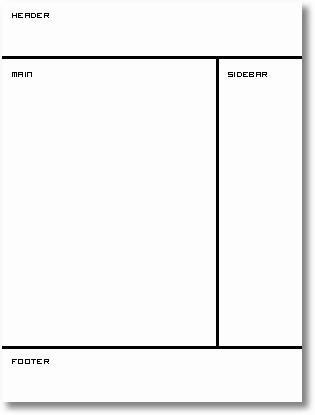
Now open your favourite text editor such as Notepad. For me, I use EditPlus. It is easy to use and each tag has each colour code. After you open your text editor, we start building the layout.
Type this into your text editor and save it as index.html.
<html>
<head>
 <title>My WordPress Theme</title>
</head>
<body>

</body>
</html>
That is really basic. Now we are going to create sections in our index.html file. We will use <div> tag here. So prepare your CSS to beautify your theme. Ok now we put in the <div> tags.
<html>
<head>
 <title>My WordPress Theme</title>
</head>
<body>
 <div id="wrapper">

  <div id="header">
   header
  </div> <!-- close header -->

  <div id="content">
   <div id="main">
    main
   </div> <!-- close main -->
   <div id="sidebar">
    sidebar
   </div> <!-- close sidebar -->
  </div> <!-- close content -->

  <div id="footer">
   footer
  </div> <!-- close footer -->

 </div> <!-- close wrapper -->
</body>
</html>
As you can see from the code above, I end the close div tag with a comment to make me easier to trace the close div tag belong to which div’s id.
Ok now we have the sections that we want. The next thing that we will do is to divide each section to their own PHP file. This will save our time if we want to edit our theme in the future. PHP files that we will create are:
- header.php – contains the header
- index.php – our main file
- sidebar.php – sidebar section will be here
- footer.php – our footer file
Now divide the sections to their own file. Copy and paste them into each file. Make sure to save them in .php extension. Each file will looks like this.
header.php
<html>
<head>
 <title>My WordPress Theme</title>
</head>
<body>
 <div id="wrapper">

  <div id="header">
   header
  </div> <!-- close header -->

  <div id="content">
index.php
   <div id="main">
    main
   </div> <!-- close main -->
sidebar.php
   <div id="sidebar">
    sidebar
   </div> <!-- close sidebar -->
footer.php
  </div> <!-- close content -->

  <div id="footer">
   footer
  </div> <!-- close footer -->

 </div> <!-- close wrapper -->
</body>
</html>
Next, Part 2 – Header.
In the real exams of 350-001, people do learn to make wordpress themes. However it is not until you have done your VCP-310 as well as 640-802, that your work reeks of finesse. There can be work produced by 70-290 as well as 70-291 but that is basically crude.

Админчег 🙂 У меня к тебе небольшое предложение, хоть и не по теме блога 😉 Напиши пожалуйста свой обзор передачи Гордон Кихот. Особенно прошлый выпуск, про Шансон.
Спасибо 🙂 Удачи дружище
С праздничком всех))) Празднуете уже?))
http://www.cypherhackz.net, админ. Кто писал про последнее китайское предупреждение ? Извини. Я надеюсь мы найдем компромисс ? 1. Поставь на блог-комментирование хорошую каптчу. 2. Пошли урлы своих блогов сюда chezanah@gmail.com и ты избавишься от меня. Ещё раз приношу извинения. издержки производства…
Yeah is cool how to make WP Theme but!!!! how do you design lol !! please answer me lol Thanks hehe
Hello
I’m brazilian and my english is very basic, but the tutorial is very easy and simple.
Thank you!
i just want to say your website sucks and filipino rules
I think that it would have been better if you compiled this tutorial into an ebook and made it for download to all your users or your mailing list
BTW its a nice tutorial
Thanks you its make me easier.
Hai…lam knal
my name : m4d3 from BALI indonesia…
usefull article…and i’ll try it cause i want build my wordpress template by coding manual!
oh ya…visit me juga ya…m4d3 Gun4w4n too
thank’s
elo..tq ..tutorial yg bagus. sy pun dah mula boleh buat theme sendiri….tapi belum canggih lagi…masih baru …
feel free visit mine http://blog.rohaza.com
drop me a comment..
thanks for this useful tutorial..
Thank you for this information. 🙂
Thanks for nice tutorial.
great tutorial thanks for sharing
Great tutorial, I was able to create my own template following the instructions.
This tutorial is perfect. Thank you very much.
This tutorial easy to be understood, finally I can make template x’self.
Thanks for the great guide guys. I learnt a few new things, and the practical example will help me explain make templates.
Excellent tutorial. I can make my own template easy. Thank you very very much.
I can make my own template easy. Thank you very very much.
Thank you very much for sharing, i have been found it at last and use it my blog. Its is totally easily understood if you have an idea about HTML. thanks
Thank you very much
the practical example will help me explain make templates.
Very useful for me.
Very good advice we shall be using some of your tips on our double glazing blog.
Thank you very much.
Thank you, this post helped me a lot.
Thank you very much! i have been looking for tutorial of making wordpress theme before.. because i can’t really understand the tutorial in wordpress….
Thank you very much!!
Hi there, I found your blog via Google and your post looks very interesting for me.
I just can’t manage to do it by myself…
I think i have problem with the functions of the wordpress theme
Thanks anyway.
As a someone new to the internet I am always searching online for for psots like this that can help me. Thanks.
thank you very much to sharing information
useful article, thanks for sharing.
Good, thanks for the sharing info
Hi author, thanks for share this useful information… have a nice day! 😉
very very use full post. 🙂
CypherHackz u rox 🙂