After I released my first WordPress theme to public, I make another theme for my site, CypherFS Royale . Then an idea sparkling into my head. Why not I make a tutorial on how to make WordPress theme to public? I’m sure there are many peoples are looking to make their own theme for their website. So lets get started.
But before we proceed, I want to tell you first that this tutorial only covers on how to set the layout and the tags or functions needed to make your WordPress theme works perfectly. It is really basic. I will not teach you html, css and php here. You need to learn them by yourself. There are many tutorials available on the net. I’m sure you can found them in ease.
Ok, I split this tutorial to 7 parts. Here are some details for each part.
- Part 1 – The Layout
- Part 2 – Header
- Part 3 – Index
- Part 4 – Comment
- Part 5 – Sidebar
- Part 6 – Footer
- Part 7 – Finish!
Let’s begin the Part 1 – The Layout.
The best thing in using WordPress is we can divide our theme into section. Eg: header.php, index.php, etc. But before that, we need to create our theme layout first. To do it, we start with blank html file. Btw theme that we will make here is two columns theme.
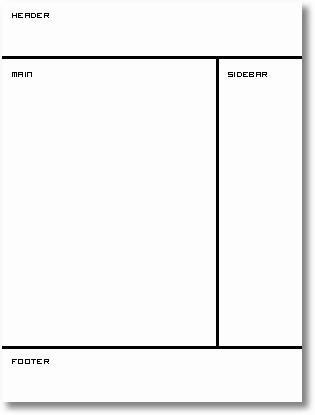
Now open your favourite text editor such as Notepad. For me, I use EditPlus. It is easy to use and each tag has each colour code. After you open your text editor, we start building the layout.
Type this into your text editor and save it as index.html.
<html>
<head>
 <title>My WordPress Theme</title>
</head>
<body>

</body>
</html>
That is really basic. Now we are going to create sections in our index.html file. We will use <div> tag here. So prepare your CSS to beautify your theme. Ok now we put in the <div> tags.
<html>
<head>
 <title>My WordPress Theme</title>
</head>
<body>
 <div id="wrapper">

  <div id="header">
   header
  </div> <!-- close header -->

  <div id="content">
   <div id="main">
    main
   </div> <!-- close main -->
   <div id="sidebar">
    sidebar
   </div> <!-- close sidebar -->
  </div> <!-- close content -->

  <div id="footer">
   footer
  </div> <!-- close footer -->

 </div> <!-- close wrapper -->
</body>
</html>
As you can see from the code above, I end the close div tag with a comment to make me easier to trace the close div tag belong to which div’s id.
Ok now we have the sections that we want. The next thing that we will do is to divide each section to their own PHP file. This will save our time if we want to edit our theme in the future. PHP files that we will create are:
- header.php – contains the header
- index.php – our main file
- sidebar.php – sidebar section will be here
- footer.php – our footer file
Now divide the sections to their own file. Copy and paste them into each file. Make sure to save them in .php extension. Each file will looks like this.
header.php
<html>
<head>
 <title>My WordPress Theme</title>
</head>
<body>
 <div id="wrapper">

  <div id="header">
   header
  </div> <!-- close header -->

  <div id="content">
index.php
   <div id="main">
    main
   </div> <!-- close main -->
sidebar.php
   <div id="sidebar">
    sidebar
   </div> <!-- close sidebar -->
footer.php
  </div> <!-- close content -->

  <div id="footer">
   footer
  </div> <!-- close footer -->

 </div> <!-- close wrapper -->
</body>
</html>
Next, Part 2 – Header.
In the real exams of 350-001, people do learn to make wordpress themes. However it is not until you have done your VCP-310 as well as 640-802, that your work reeks of finesse. There can be work produced by 70-290 as well as 70-291 but that is basically crude.

Hi,
Thank you very much for this useful article,
I’ve translated it to Chinese, please have a look of it, thanks.
Here is the link:
http://www.onedust.com/archives/281
I’ve just finished the part 1, and will keep translate the follows, hope that you don’t mind I haven’t tell you before the translation, if you do, please let me know, many thanks.
Sulow
Much Oblige! very useful for the novice like me
wow, nice tutorial…thanks for sharing. I’m still newbie in wordpress world
All templates have the same number of .php files?
i wanna make a theme
YOUR THEME IS GOOD! I WILL DOWNLOADS!
Thanks, Nice tutorial I will try to make my own theme
Nice job. The new users to WordPress will definitely find it useful.
This tutorial is good. But we want more explanation.
Awesome guide.
Thank you very much for this useful article,
Thanks for the lesson.
Dav
your tutorial aside, you need to brush up on your english.
@jerryho: This guy has just gone out of his way to make an extremely useful article, helping by the looks of it a good few hundred people create their own WP themes and has even been kind enough to answer peoples questions and all you can do is tell him he needs to brush up on his english. Get a grip and don’t bother commenting if you don’t have anything good to say – your comment isn’t even constructive.
познавательно тут у вас 🙂
it is a good website to make theme
this is good but i need more explanation thank you
That’s good explanation, thanks for the lesson very much.
Nia
can one integrate a wordpress theme into blogger
hiya! Nice tutorial
I’ve a problem… why is my index page white? I added a css but nothing, the page remains WHITE! 🙁
Thanks you its make me easier.
Very detailed tutorial. thanks for sharing it. i am happy i can edit or make my own theme..
Good content and posting, i learn creating my theme here.
thanks alot, really help me alot.
🙂
kan kan zai shuo
I can make my own template easy. Thank you very very much.
Very informative & detailed article about making wordpress theme. i would really appreciate if you provide us the same excellent tutorial about making a php directory template.
Cool Great!
Thank you very much for this useful article,
great information thank you
This is great information. Thank you for sharing. You are a generous soul.
danny
heftig
handy downloaden
bugging
spy optics cooper
amazing and very easy tutorail thanks alot
аквариумные рыбки
cypherhack (CH)
CH, nak buat teguran sikit boleh x?
Sebenarnya saya nak ikut tutorial awak step by step, kalau ada ralat saya tegur.
Sila semak semula post awak di atas bahagian file header.php ada sedikit ralat.
header.php
belum dikunci dengan
TQ.
sori la. salah faham. baru saya faham kenapa CH taip mcm tu.
This is a fantastic post. I’m going to get started right away!
Very insightful post. Thanks.
Great tutorial. Thanks for taking the time to share this.