After I released my first WordPress theme to public, I make another theme for my site, CypherFS Royale . Then an idea sparkling into my head. Why not I make a tutorial on how to make WordPress theme to public? I’m sure there are many peoples are looking to make their own theme for their website. So lets get started.
But before we proceed, I want to tell you first that this tutorial only covers on how to set the layout and the tags or functions needed to make your WordPress theme works perfectly. It is really basic. I will not teach you html, css and php here. You need to learn them by yourself. There are many tutorials available on the net. I’m sure you can found them in ease.
Ok, I split this tutorial to 7 parts. Here are some details for each part.
- Part 1 – The Layout
- Part 2 – Header
- Part 3 – Index
- Part 4 – Comment
- Part 5 – Sidebar
- Part 6 – Footer
- Part 7 – Finish!
Let’s begin the Part 1 – The Layout.
The best thing in using WordPress is we can divide our theme into section. Eg: header.php, index.php, etc. But before that, we need to create our theme layout first. To do it, we start with blank html file. Btw theme that we will make here is two columns theme.
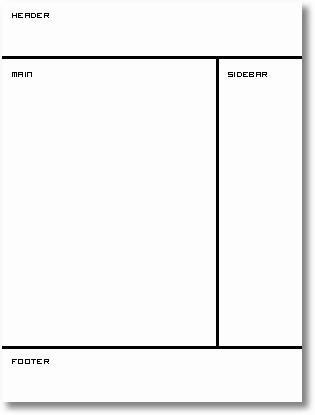
Now open your favourite text editor such as Notepad. For me, I use EditPlus. It is easy to use and each tag has each colour code. After you open your text editor, we start building the layout.
Type this into your text editor and save it as index.html.
<html>
<head>
 <title>My WordPress Theme</title>
</head>
<body>

</body>
</html>
That is really basic. Now we are going to create sections in our index.html file. We will use <div> tag here. So prepare your CSS to beautify your theme. Ok now we put in the <div> tags.
<html>
<head>
 <title>My WordPress Theme</title>
</head>
<body>
 <div id="wrapper">

  <div id="header">
   header
  </div> <!-- close header -->

  <div id="content">
   <div id="main">
    main
   </div> <!-- close main -->
   <div id="sidebar">
    sidebar
   </div> <!-- close sidebar -->
  </div> <!-- close content -->

  <div id="footer">
   footer
  </div> <!-- close footer -->

 </div> <!-- close wrapper -->
</body>
</html>
As you can see from the code above, I end the close div tag with a comment to make me easier to trace the close div tag belong to which div’s id.
Ok now we have the sections that we want. The next thing that we will do is to divide each section to their own PHP file. This will save our time if we want to edit our theme in the future. PHP files that we will create are:
- header.php – contains the header
- index.php – our main file
- sidebar.php – sidebar section will be here
- footer.php – our footer file
Now divide the sections to their own file. Copy and paste them into each file. Make sure to save them in .php extension. Each file will looks like this.
header.php
<html>
<head>
 <title>My WordPress Theme</title>
</head>
<body>
 <div id="wrapper">

  <div id="header">
   header
  </div> <!-- close header -->

  <div id="content">
index.php
   <div id="main">
    main
   </div> <!-- close main -->
sidebar.php
   <div id="sidebar">
    sidebar
   </div> <!-- close sidebar -->
footer.php
  </div> <!-- close content -->

  <div id="footer">
   footer
  </div> <!-- close footer -->

 </div> <!-- close wrapper -->
</body>
</html>
Next, Part 2 – Header.
In the real exams of 350-001, people do learn to make wordpress themes. However it is not until you have done your VCP-310 as well as 640-802, that your work reeks of finesse. There can be work produced by 70-290 as well as 70-291 but that is basically crude.

privet a ne mogu nayti russkiy variant stat`i troy sayt v RU zone k sozhaleniyu zakrit ((
esli ne v lomi vishli na email pls
generator2003(sobachko)gmail.com
ummm do you know how to create a bloggers template on our own or how to convert a wordpress theme to bloggers??
Nope. I don't know anything about blogger structure and don't know how to convert wordpress theme to blogger. Sorry buddy. Can't help.
Its okey
woohoo
Wow awesome!
From here probably i can make myself more better tahn b4 eheh 😉
Thanks bro!
How do i make the css file???
open a text editor , write css code, save it as name.css 🙂
thanks for this great tutorial
Nice tutorial!
I have a question: can one integrate a wordpress theme into blogger ( aka blogspot)? How?
If for that, you need to do a loy of modification to that theme. 🙂
Nice guide there. You’ve explained everthing well. By the way I got similar tutorial at my blog. I hope it’s good enough. I tried to explain everything step by step and very comprehensively, too.
Thanks for the tutorial! Qoooool!
well i wil give it a try
Thanks for nice tutorial. I will give them a try and let you know.
Nice tips, how about archive page n’ search result page?
i’ve search many sites to get the fit tutorial for wordpress, and i fall here, wow … with your illustrations, its make me easier. Thanks.
helo bro. thanks a lot. memang tutorial ni BANYAK mengajar saya budak yg baru belajor ni..
walaupu basic tapi berharga sangat..
saya dah lama nak buat wordpress theme sendiri…lagi ummphh..asyik pakai template orang aje….saya tak mau jadi end user aje….keep a good work bro;;
rohaza
http://rohaza.com
Thank you so much.
Nice article! It’s very useful.
🙂
This is great, thank you.
Would you ever have time to do a write-up on how to add a ‘magazine’ style index.php?
Sort of like Mimbo.
Great tutorials mate. Looks great on the iPhone too.
Thanks for the tutorial I learned alot from it
I need new wordpress theme 🙂
thank you so much…so much 1000X so much…
I just got a difficulty with a template I download…I’m considering to make my own…but don’t know how…
I ‘m definitely going to put your web in my web (^.^) …
very nice tutorial… anyone can understand it easily, it has helped me a lot! tnx!