Announcement!

Have you read the author's personal blog? FYI, his personal blog is written in Malay.

After I released my first Wordpress theme to public, I make another theme for my site, CypherFS Royale . Then an idea sparkling into my head. Why not I make a tutorial on how to make Wordpress theme to public? I’m sure there are many peoples are looking to make their own theme for their website. So lets get started.

But before we proceed, I want to tell you first that this tutorial only covers on how to set the layout and the tags or functions needed to make your Wordpress theme works perfectly. It is really basic. I will not teach you html, css and php here. You need to learn them by yourself. There are many tutorials available on the net. I’m sure you can found them in ease.

Ok, I split this tutorial to 7 parts. Here are some details for each part.

Let’s begin the Part 1 – The Layout.

The best thing in using Wordpress is we can divide our theme into section. Eg: header.php, index.php, etc. But before that, we need to create our theme layout first. To do it, we start with blank html file. Btw theme that we will make here is two columns theme.
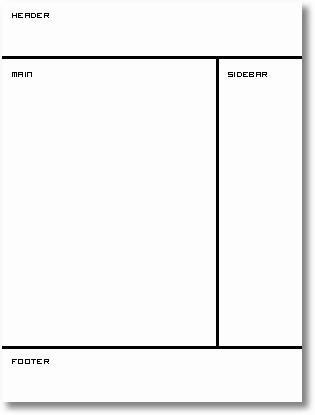
MyOWT---Part-1

Now open your favourite text editor such as Notepad. For me, I use EditPlus. It is easy to use and each tag has each colour code. After you open your text editor, we start building the layout.

Type this into your text editor and save it as index.html.

  1.  
  2.  <title>My Wordpress Theme</title>
  3. </head>
  4.  
  5. </body>
  6. </html>
  7.  

That is really basic. Now we are going to create sections in our index.html file. We will use <div> tag here. So prepare your CSS to beautify your theme. Ok now we put in the <div> tags.

  1.  
  2.  <title>My Wordpress Theme</title>
  3. </head>
  4.  <div id="wrapper">
  5.  
  6.   <div id="header">
  7.    header
  8.   </div> <!– close header –>
  9.  
  10.   <div id="content">
  11.    <div id="main">
  12.     main
  13.    </div> <!– close main –>
  14.    <div id="sidebar">
  15.     sidebar
  16.    </div> <!– close sidebar –>
  17.   </div> <!– close content –>
  18.  
  19.   <div id="footer">
  20.    footer
  21.   </div> <!– close footer –>
  22.  
  23.  </div> <!– close wrapper –>
  24. </body>
  25. </html>
  26.  

As you can see from the code above, I end the close div tag with a comment to make me easier to trace the close div tag belong to which div’s id.

Ok now we have the sections that we want. The next thing that we will do is to divide each section to their own PHP file. This will save our time if we want to edit our theme in the future. PHP files that we will create are:

  • header.php – contains the header
  • index.php – our main file
  • sidebar.php – sidebar section will be here
  • footer.php – our footer file

Now divide the sections to their own file. Copy and paste them into each file. Make sure to save them in .php extension. Each file will looks like this.

header.php

  1.  
  2.  <title>My Wordpress Theme</title>
  3. </head>
  4.  <div id="wrapper">
  5.  
  6.   <div id="header">
  7.    header
  8.   </div> <!– close header –>
  9.  
  10.   <div id="content">
  11.  

index.php

  1.  
  2.    <div id="main">
  3.     main
  4.    </div> <!– close main –>
  5.  

sidebar.php

  1.  
  2.    <div id="sidebar">
  3.     sidebar
  4.    </div> <!– close sidebar –>
  5.  

footer.php

  1.  
  2.   </div> <!– close content –>
  3.  
  4.   <div id="footer">
  5.    footer
  6.   </div> <!– close footer –>
  7.  
  8.  </div> <!– close wrapper –>
  9. </body>
  10. </html>                                                                                                                                                          
  11.  

Next, Part 2 – Header.

In the real exams of 350-001, people do learn to make wordpress themes. However it is not until you have done your VCP-310 as well as 640-802, that your work reeks of finesse. There can be work produced by 70-290 as well as 70-291 but that is basically crude.

Subscribe me feed! If you enjoyed this article, get latest updates via RSS feed or by email.

155 Responses to “Make your Own Wordpress Theme – Part 1”

  1. aman
    December 13th, 2006 | 7:10 pm

    nice tutorial dude…very useful :d

  2. ikram_zidane
    December 13th, 2006 | 9:03 pm

    better kalau buat untuk xhtml… nice try…

  3. novatech
    December 13th, 2006 | 11:55 pm

    hahahaha ko dah balik dari bercuti ke?
    rajin ko wat tutorial mende ni :-?
    ok la tu.. nice work

  4. eches
    December 14th, 2006 | 10:28 am

    bleh blaja buat from the scratch :d gud2!

  5. CypherHackz
    December 14th, 2006 | 6:38 pm

    [Comment ID #15599 Will Be Quoted Here]

    leh je tukar jadi xhtml kalau nak. hu3. tu semua bergantung kepada designer tu la sama ada nak atau tak. aku just tunjuk yang basic je. :d

    [Comment ID #15603 Will Be Quoted Here]

    dah balik cuti dah. jap lagi baru aku nak update personal blog aku tu. hu3.

  6. x3ro
    December 15th, 2006 | 9:22 pm

    bro cypher..maybe next time leh post kan meta tag tuk ape id: header tuk ape..id: wrapper tuk ape..id: sidebar tuk ape..etc..kalau tgk structure je n trus buat..tp tak tau fungsi tak gunegaks kan..anyway great post..besh giler bace..

  7. Wizurai
    December 16th, 2006 | 12:09 am

    kalo nak letak sidetbar ngan rightbar sama jugak ke cara dia?

  8. CypherHackz
    December 16th, 2006 | 2:31 am

    [Comment ID #15672 Will Be Quoted Here]

    yang tu html sebenarnye. dats why kene tahu basic html dulu. he3. kalau nak gune nama lain pun boleh. takde masalahnyer. :)

    [Comment ID #15673 Will Be Quoted Here]

    kalau macam ni, selalu orang buat die call file. nak call file tu kene gune php.

  9. Masa Pembelajaran Themes telah pun Bermula! | RajaBLog.info
    January 29th, 2007 | 2:09 am

    [...] Klik disini untuk ke Cyperhack.net [...]

  10. goggle
    February 6th, 2007 | 1:58 pm

    I found your tutorial extremely useful as a basic guide to starting the wordpress theme

  11. Interesting Links - December 15, 2006 » Freakitude
    February 6th, 2007 | 4:36 pm

    [...] Make Your Own Wordpress Theme [...]

  12. CypherHackz
    February 6th, 2007 | 5:33 pm

    [Comment ID #20131 Will Be Quoted Here]

    thank you for your comment. :)

  13. My Homework » Blog Archive » Hello world!
    February 17th, 2007 | 12:29 pm

    [...] Found it here. [...]

  14. brokensyllabus.net » Blog Archive » Make your own word press theme
    February 21st, 2007 | 1:28 pm

    [...] Make your own theme tutorial [...]

  15. Josef
    March 7th, 2007 | 8:16 am

    I think the tuturial is very useful. I follow it step by step. But I don’t belive the ‘copy and paste code’ in my computer will run at the end.

    I need a zip-file of all the related files from the demo theme. Does someone has al link with the ready final demo code?

    cu

  16. CypherHackz
    March 8th, 2007 | 8:21 am

    i guess you can find it in the wordpress default theme. :) i just use some codes (not all) from there.

  17. khalid
    March 9th, 2007 | 11:58 am

    nice tutorial
    Thank you:)>-

  18. CypherHackz
    March 9th, 2007 | 8:16 pm

    thank you. :d

  19. Digital Caribbean » Blog Archive » links for 2007-03-19
    March 19th, 2007 | 9:31 am

    [...] Make your Own Wordpress Theme – Part 1 at CypherHackz.Net (tags: wordpress HTML) [...]

  20. » I Need You at ChoosingDestiny.Org - ChoosingDestiny.Org
    April 2nd, 2007 | 12:15 pm

    [...] a new way of theming my WP template (many thanks to CypherHackz), instead of modifying from the defualt WP template which will only make a mess whenever I upgrade [...]

  21. wordpress developer » Blog Archive » Ulkoasua muokkaamaan
    April 11th, 2007 | 4:06 am

    [...] artikkeli omien teemojen rakentamista, mikä auttaa ymmärtämään myös valmiita teemoja, löytyy täältä. Teema määrää minkälaisia elementtejä blogin eri sivuilla on esitetty ja missä kohtaa ne [...]

  22. Justin Jung
    April 12th, 2007 | 3:03 am

    Justin Jung would like to invite you to share his Search Engine Marketing Expertise – SEM Expertise such as Pay per Click Advertising and Search Engine Optimization. Please visit the following website.

    http://www.semexpertise.com

  23. doug rosbury
    April 23rd, 2007 | 5:53 am

    your tutorial aside, you need to brush up on your english.

  24. Christina Bay
    April 28th, 2007 | 5:53 pm

    Hi,

    Wow, congratulations for being among the first few top search results to ‘wordpress theme tutorial’ keywords.

    I’ve bookmarked your site. I’ve been wanting to create my own template for a while. Your guide will certainly come in handy.

    Thank you very much!

    Chrissy
    http://www.hotelsandtravel.org

  25. CypherHackz
    April 29th, 2007 | 11:19 pm

    [Comment ID #39355 Will Be Quoted Here]

    ha3. yeah! sure… lol…

  26. Tiger-Whispers Designs » » New Design
    May 9th, 2007 | 10:38 am

    [...] be changing the index page through Wordpress. I have found a wonderful new Wordpress tutorial from Cyperhackz.net (this link will take you directly to the tutorial) and I am thinking that I may have a grip on it. [...]

  27. Wordpress Links
    May 10th, 2007 | 11:02 pm

    [...] Make your own Theme [...]

  28. Anders Moen
    May 27th, 2007 | 8:10 pm

    Thanks for this great guide! Very useful

  29. » My First Theme
    May 28th, 2007 | 1:24 am

    [...] the index page, I felt like I needed some gratification for my hard work, so I found a how-to on making your first WP theme, and dove right into chopping up my XHTML. For the most part, theme-izing your design is pretty [...]

  30. CMS Articles, CMS Reviews and CMS Demos
    June 7th, 2007 | 4:38 pm

    Nice tutorial.

    I have also written a similar article called Developing a Wordpress Theme.

  31. Solo Tutoriales » Como Crear un theme para WordPress
    June 8th, 2007 | 1:05 pm

    [...] CypherHackz – Make your Own Wordpress Theme – Part 1 [...]

  32. CMG Technologies
    June 8th, 2007 | 6:11 pm

    Hey there, I have some free CSS templates at http://www.cmgtechnologies.com.....plates.php, is there a way you can port those to wordpress for me, for a fee or something ? Or some sort of partnership ?

  33. CypherHackz
    June 9th, 2007 | 9:34 am

    check your email. i just sent a reply to you. :)

  34. Blank Wordpress Theme at cannontrodder’s world - cannontrodder - Getting nothing done since 1975.
    June 15th, 2007 | 3:36 am

    [...] created the theme for this site by following a tutorial at http://www.cypherhackz.net. Before I started to build the site up into this style, I took a zip of the [...]

  35. Rijalul Fikri
    June 16th, 2007 | 1:22 pm

    Nice tutorial! Thx’s for sharing it with us. Very useful tutorial for me as a newbie in this field. It’s been a long time for me to find how to themes my own design. Thank you !!! :)

  36. masst
    June 17th, 2007 | 4:48 pm

    I’m still blur with all this codes and stuff.. Got the heart to do it but just confused. =S

  37. zaki
    June 21st, 2007 | 10:20 pm

    this page ranked 18th on google for ‘how to create wordpress template’ not bad.. Cool:d

  38. Wordpress: The Ultimate Blackhat Platform
    July 1st, 2007 | 7:06 pm

    [...] Make your own wordpress theme: http://www.cypherhackz.net/arc.....me-part-1/ [...]

  39. untuk
    July 3rd, 2007 | 5:51 am

    untuk! :o

  40. Everything You Need to Run a WordPress Blog << Vandelay Website Design
    July 10th, 2007 | 6:11 am

    [...] Make your own theme [...]

  41. Nathan
    August 8th, 2007 | 5:18 am

    for some reason i keep getting errors on the index.php page. i even copied exactly what you had on your index.php file, and it’s still giving me errors. what am i doing wrong?

    my website

  42. 10 links per creare il tuo tema WordPress | Napolux.com
    August 21st, 2007 | 3:04 pm

    [...] Make Your Own WordPress Theme [...]

  43. uowz.com - free for freedom » Blog Archive » Dress Your Blog for Success
    October 5th, 2007 | 1:14 pm

    [...] Make Your Own WordPress Theme from CypherHackz [...]

  44. Tutorial ang Hebat ! TQ | gurucyber.com
    October 25th, 2007 | 5:16 pm

    Memang best tutorial hang ni.. teruskan usaha murni tue..:d

  45. reezluv
    November 20th, 2007 | 1:54 pm

    wow..nice tutorial..malay one..patut tulih ebook lagi bagus..:)

  46. Membuat Themes Wordpress « Belajar Wordpress
    November 23rd, 2007 | 11:38 pm

    [...] ? jelas ! … kalo mau sih bisa belajar di Cypherhackz atau WPdesigner ini, step-stepnya ada n jelas kog kalau rajin dan familiar sama [...]

  47. pixey.de » Blog Archive » Tutorials Konvertierung von PSD zu CSS zbsp. für Wordpressthemes
    November 24th, 2007 | 7:35 pm

    [...] Make your wordpress theme – in 6 Schritten zum eigenen 2 Spalten Wordpress theme [...]

  48. Everything You Need to Run a WordPress Blog
    November 25th, 2007 | 3:37 am

    [...] Make your own theme [...]

  49. generator2003
    December 12th, 2007 | 9:30 am

    privet a ne mogu nayti russkiy variant stat`i troy sayt v RU zone k sozhaleniyu zakrit ((
    esli ne v lomi vishli na email pls
    generator2003(sobachko)gmail.com

  50. Choosing A WordPress Theme | LimeTouch
    December 16th, 2007 | 11:36 am

    [...] If you have decided to create your own WordPress theme, here is a very comprehensive 7 step guide by cyberhackz.net on how to integrate WordPress functions and setting the layout for your theme. [...]

  51. Ngebuat Template Wordpress dengan Tools « Entrepreneur’s Indonesia
    December 16th, 2007 | 11:48 pm

    [...] ? jelas ! … kalo mau sih bisa belajar di Cypherhackz atau WPdesigner ini, step-stepnya ada n jelas kog kalau rajin dan familiar sama [...]

  52. sensibleguy
    December 21st, 2007 | 6:58 pm

    ummm do you know how to create a bloggers template on our own or how to convert a wordpress theme to bloggers??

  53. CypherHackz
    December 22nd, 2007 | 6:34 pm

    Nope. I don't know anything about blogger structure and don't know how to convert wordpress theme to blogger. Sorry buddy. Can't help.

  54. sensibleguy
    December 24th, 2007 | 12:31 am

    Its okey

  55. Membuat Themes Wordpress | :: prime79 ::
    January 10th, 2008 | 11:09 am

    [...] ? jelas ! … kalo mau sih bisa belajar di Cypherhackz atau WPdesigner ini, step-stepnya ada n jelas kog kalau rajin dan familiar sama [...]

  56. » Wordpress theme creation. at SPIRALOZDOTCOM - somehow you ended up here.
    January 25th, 2008 | 12:07 am

    [...] you want to learn how to develop your own Wordpress theme, I recommend the Cyberhackz tutorial, it’s straight forward and to the point, and honestly, once you’ve done one, [...]

  57. Want to create a Wordpress theme? | Hi-Tech Momma
    February 1st, 2008 | 5:40 am

    [...] Make Your Own Wordpress Theme at CypherHacks [...]

  58. Jeffry
    February 5th, 2008 | 8:17 pm

    woohoo

  59. megat
    February 15th, 2008 | 4:07 pm

    Wow awesome!

    From here probably i can make myself more better tahn b4 eheh ;)

    Thanks bro!

  60. Maria Irrera
    March 3rd, 2008 | 1:03 am

    How do i make the css file???

  61. bilalghouri
    March 7th, 2008 | 6:44 pm

    open a text editor , write css code, save it as name.css :)

  62. I Hate My WordPress Theme! Yuck!! | Internet Business Opportunities | oibo dot org
    March 13th, 2008 | 3:01 am

    [...] slightly old posts over at CypherHackz.net that teach you how to create your own WordPress themes – http://www.cypherhackz.net/arc.....part-1/.  Fantastic!  Just what I was looking [...]

  63. Welcome
    March 28th, 2008 | 8:30 pm

    [...] Make your Own Wordpress Theme by Fauzi Mohd Darus [...]

  64. WordPress Theme Design Resources | Web Hosting Blog | Lunarpages Lunartics
    April 7th, 2008 | 7:39 pm

    [...] Make Your Own WordPress Theme [...]

  65. Sufiyan
    April 9th, 2008 | 3:29 pm

    thanks for this great tutorial

  66. Alina
    April 10th, 2008 | 9:43 pm

    Nice tutorial!

    I have a question: can one integrate a wordpress theme into blogger ( aka blogspot)? How?

  67. CypherHackz
    April 10th, 2008 | 11:23 pm

    If for that, you need to do a loy of modification to that theme. :)

  68. » Blog Archive » links for 2008-04-10
    April 11th, 2008 | 7:44 am

    [...] Fonts Of The Month: GrauBlau, Nevis | Fonts | Smashing MagazineMake your Own Wordpress Theme – Part 1 at CypherHackz.NetWPDesigner » So you want to create WordPress themes huh?The W3C CSS Validation ServiceThe W3C [...]

  69. Net Covered
    April 18th, 2008 | 4:07 am

    Nice guide there. You’ve explained everthing well. By the way I got similar tutorial at my blog. I hope it’s good enough. I tried to explain everything step by step and very comprehensively, too.

  70. » Blog Archive » Make your Own Wordpress Theme - Part 1 at CypherHackz.Net
    May 9th, 2008 | 5:34 pm

    [...] Make your Own Wordpress Theme – Part 1 at CypherHackz.Net [...]

  71. Membuat themes d wp : PERMAINAN BERFANTASI
    May 27th, 2008 | 11:11 am

    [...] ? jelas ! … kalo mau sih bisa belajar di Cypherhackz atau WPdesigner ini, step-stepnya ada n jelas kog kalau rajin dan familiar sama [...]

  72. kelly
    May 27th, 2008 | 8:38 pm

    Thanks for the tutorial! Qoooool!

  73. من هنا وهناك 2
    May 30th, 2008 | 4:55 pm

    [...] بالجامعة التكنولوجية في ماليزيا يخبرنا بالتفصيل عن كيفية عمل ثيم لمدونة الووردبريس ، كل ما يلزمك هو معرفة بسيطة ب ال HTML ، وستجد نفسك تستطيع [...]

  74. Superman7878
    June 1st, 2008 | 10:47 pm

    well i wil give it a try

  75. freelance web designer
    June 2nd, 2008 | 12:10 pm

    Thanks for nice tutorial. I will give them a try and let you know.

  76. Gfanatic » Blog Archive » Don’t forget Google Analytics, or else!
    June 6th, 2008 | 12:41 pm

    [...] I made my own Wordpress theme, and experimented with php codes, css, and html. However, I wasn’t satisfied with it. I was [...]

  77. Killua
    June 11th, 2008 | 12:27 pm

    Nice tips, how about archive page n’ search result page?

  78. kang bull
    June 20th, 2008 | 7:24 am

    i’ve search many sites to get the fit tutorial for wordpress, and i fall here, wow … with your illustrations, its make me easier. Thanks.

  79. rohaza
    June 24th, 2008 | 2:57 pm

    helo bro. thanks a lot. memang tutorial ni BANYAK mengajar saya budak yg baru belajor ni..

    walaupu basic tapi berharga sangat..

    saya dah lama nak buat wordpress theme sendiri…lagi ummphh..asyik pakai template orang aje….saya tak mau jadi end user aje….keep a good work bro;;

    rohaza
    http://rohaza.com

  80. Zalebox
    June 26th, 2008 | 1:17 pm

    Thank you so much.

    Nice article! It’s very useful.

    :)

  81. Making Own Wordpress Theme
    July 16th, 2008 | 9:39 pm

    [...] are wpdesigner and cypherhackz [...]

  82. Make WP theme « Better Wordpress..
    July 21st, 2008 | 10:32 pm

    [...] This tutorial is split to 7 chapter, see here. [...]

  83. Construido en erian
    August 13th, 2008 | 3:37 pm

    [...] muchos tutoriales que me ayudaron a darle exactamente la forma que yo quería. Uno de ellos fue este, que si bien es un poco despelotado, me aclaró un par de [...]

  84. rad_thundercat
    August 27th, 2008 | 12:19 am

    This is great, thank you.

    Would you ever have time to do a write-up on how to add a ‘magazine’ style index.php?

    Sort of like Mimbo.

  85. Blogger, Gunalah Wordpress di BlogAku.Net
    September 7th, 2008 | 10:04 am

    [...] cantik-cantik dan memang menarik digunakan. Dah tu pulak, ianya percuma lagik. Selain daripada itu, kaedah untuk membuat theme Wordpress tidaklah sukar. Aku sudah buat beberapa themes untuk Wordpress. Themes blog yang korang sedang [...]

  86. englisch üben
    September 13th, 2008 | 1:54 pm

    Great tutorials mate. Looks great on the iPhone too.

  87. Angus
    September 14th, 2008 | 7:37 am

    Thanks for the tutorial I learned alot from it

  88. Urban
    September 16th, 2008 | 6:40 pm

    I need new wordpress theme :)

  89. nichan
    September 18th, 2008 | 4:07 pm

    thank you so much…so much 1000X so much…
    I just got a difficulty with a template I download…I’m considering to make my own…but don’t know how…
    I ‘m definitely going to put your web in my web (^.^) …

  90. rohanmedia.com » Blog Archive » www: nu gasesti chiar tot
    September 19th, 2008 | 6:29 pm

    [...] Invata pas cu pas cum sa iti faci blogul tau aici [...]

  91. Membuat template wordpress sendiri dengan mudah « wa2n..
    October 1st, 2008 | 5:50 am

    [...] mau sih bisa belajar di Cypherhackz atau WPdesigner, step-stepnya ada n jelas kog kalau rajin dan familiar sama [...]

  92. Wordpress Demo Site
    October 14th, 2008 | 11:03 am

    [...] Make your Own Wordpress Theme by Fauzi Mohd Darus [...]

  93. Tutoriale wordpress » DIY: Wordpress Themes
    October 17th, 2008 | 4:13 pm

    [...] Part 1 – The Layout [...]

  94. Making your own Wordpress Theme | dyvallion
    October 20th, 2008 | 10:48 pm

    [...] an interesting article that I found: Make your Own Wordpress Theme – Part 1. The presentation is neat and easy to understand. I have yet to read Part 2 and the rest of the [...]

  95. Jenelle
    October 22nd, 2008 | 12:16 pm

    very nice tutorial… anyone can understand it easily, it has helped me a lot! tnx!

  96. Top 10 Tutorials to Develop your Own Wordpress Themes | Free Adobe Photoshop Tutorials
    October 24th, 2008 | 6:39 pm

    [...] Make your Own Wordpress Theme [...]

  97. RaddyImmilm
    November 1st, 2008 | 2:10 am

    Админчег :) У меня к тебе небольшое предложение, хоть и не по теме блога ;) Напиши пожалуйста свой обзор передачи Гордон Кихот. Особенно прошлый выпуск, про Шансон.

    Спасибо :) Удачи дружище

  98. Байкал
    November 1st, 2008 | 2:51 am

    С праздничком всех))) Празднуете уже?))

  99. Прошу-Внимания
    November 3rd, 2008 | 3:55 am

    http://www.cypherhackz.net, админ. Кто писал про последнее китайское предупреждение ? Извини. Я надеюсь мы найдем компромисс ? 1. Поставь на блог-комментирование хорошую каптчу. 2. Пошли урлы своих блогов сюда chezanah@gmail.com и ты избавишься от меня. Ещё раз приношу извинения. издержки производства…

  100. Z notatnika webmasterki » Blog Archive » WordPress odc.1. Wygląd - struktura szablonu
    November 5th, 2008 | 11:31 pm

    [...] Make your Own Wordpress Theme (en) [...]

  101. Guru
    November 10th, 2008 | 11:23 pm

    Yeah is cool how to make WP Theme but!!!! how do you design lol !! please answer me lol Thanks hehe

  102. Fabrício
    November 11th, 2008 | 11:02 am

    Hello
    I’m brazilian and my english is very basic, but the tutorial is very easy and simple.
    Thank you!

  103. tae
    November 12th, 2008 | 4:16 am

    i just want to say your website sucks and filipino rules

  104. Anonymous
    November 19th, 2008 | 10:46 pm

    [...] and I’ve now got four (count ‘em…FOUR) home-made themes that I made after reading this tutorial. I know they’re not particularly fancy, but they’re mine and they do the job, so [...]

  105. Hello Casey » Blog Archive » One of My Favorite Sights
    November 21st, 2008 | 5:41 pm

    [...] found a great tutorial on making your own WordPress themes, and have been playing with Flash in class, so maybe I’ll be able to combine the two for my [...]

  106. Matt Wutzke
    November 22nd, 2008 | 11:45 am

    I think that it would have been better if you compiled this tutorial into an ebook and made it for download to all your users or your mailing list
    BTW its a nice tutorial

  107. Anil
    November 25th, 2008 | 3:13 pm

    Thanks you its make me easier.

  108. m4d3 gun4w4n
    November 28th, 2008 | 5:04 pm

    Hai…lam knal

    my name : m4d3 from BALI indonesia…

    usefull article…and i’ll try it cause i want build my wordpress template by coding manual!

    oh ya…visit me juga ya…m4d3 Gun4w4n too

    thank’s

  109. rohaza
    November 28th, 2008 | 5:34 pm

    elo..tq ..tutorial yg bagus. sy pun dah mula boleh buat theme sendiri….tapi belum canggih lagi…masih baru …

    feel free visit mine http://blog.rohaza.com
    drop me a comment..

  110. tasarhane
    December 2nd, 2008 | 4:54 am

    thanks for this useful tutorial..

  111. Busby SEO Test ikel » Blog Archive » Make your own wordpress theme How To
    December 5th, 2008 | 3:03 pm

    [...] Make your own wordpress theme part 1 by cypherhackz. [...]

  112. antiquarian books
    December 11th, 2008 | 9:17 pm

    Thank you for this information. :)

  113. Membuat Themes WordPress « Belajar Ngeblog
    December 14th, 2008 | 2:48 am

    [...] ? jelas ! … kalo mau sih bisa belajar di Cypherhackz atau WPdesigner ini, step-stepnya ada n jelas kog kalau rajin dan familiar sama [...]

  114. tony
    December 17th, 2008 | 7:14 am

    Thanks for nice tutorial.

  115. Cash Blog
    December 21st, 2008 | 7:13 am

    [...] Make Your Own Theme [...]

  116. latest love sms
    December 28th, 2008 | 12:01 am

    great tutorial thanks for sharing

  117. Hector
    February 1st, 2009 | 10:10 am

    Great tutorial, I was able to create my own template following the instructions.

  118. Template of Doom - DAY 1 « The LAY project and the Template of DOOM
    February 16th, 2009 | 1:34 pm

    [...] the WP.  Did a CSS tutorial.  Copied from the teacher. Obviously, we missed something in the lesson.  Our copy was wrong.  Way wrong.   @TimFrangioso [...]

  119. Gandul
    February 21st, 2009 | 7:21 am

    This tutorial is perfect. Thank you very much.

  120. Samuel
    February 21st, 2009 | 2:41 pm

    This tutorial easy to be understood, finally I can make template x’self.

  121. Sarodan
    February 21st, 2009 | 3:13 pm

    Thanks for the great guide guys. I learnt a few new things, and the practical example will help me explain make templates.

  122. Gazele
    February 23rd, 2009 | 3:27 pm

    Excellent tutorial. I can make my own template easy. Thank you very very much.

  123. Gazele
    February 23rd, 2009 | 3:29 pm

    I can make my own template easy. Thank you very very much.

  124. Make your Own Wordpress Theme - Part 1 « Free Templates
    February 23rd, 2009 | 3:58 pm

    [...] : Cyberhack.net Next, Part 2 – [...]

  125. Header « Free Templates
    February 23rd, 2009 | 6:20 pm

    [...] From : Cyberhack.net [...]

  126. DIY bi folding sliding doors
    February 25th, 2009 | 8:48 pm

    Thank you very much for sharing, i have been found it at last and use it my blog. Its is totally easily understood if you have an idea about HTML. thanks

  127. I Heart Wordpress « G-Augmented
    February 26th, 2009 | 4:00 pm

    [...] http://www.cypherhackz.net (Another great tutorial) [...]

  128. Membuat Themes WordPress « Jhiung
    February 27th, 2009 | 3:49 pm

    [...] ? jelas ! … kalo mau sih bisa belajar di Cypherhackz atau WPdesigner ini, step-stepnya ada n jelas kog kalau rajin dan familiar sama [...]

  129. themes « Jhiung
    February 27th, 2009 | 4:13 pm

    [...] ? jelas ! … kalo mau sih bisa belajar di Cypherhackz atau WPdesigner ini, step-stepnya ada n jelas kog kalau rajin dan familiar sama [...]

  130. Jhon Doe
    March 2nd, 2009 | 10:25 pm

    Thank you very much

  131. Jhon Doe
    March 2nd, 2009 | 10:47 pm

    the practical example will help me explain make templates.

  132. More Tests - Itamar Gilad
    March 3rd, 2009 | 1:03 am

    [...] Make your Own Wordpress Theme by Fauzi Mohd Darus [...]

  133. Bardan
    March 5th, 2009 | 12:51 am

    Very useful for me.

  134. double glazing
    March 18th, 2009 | 11:22 pm

    Very good advice we shall be using some of your tips on our double glazing blog.

  135. Bedah
    March 25th, 2009 | 11:08 pm

    Thank you very much.

  136. AlexClarke
    April 23rd, 2009 | 4:43 am

    Thank you, this post helped me a lot.

  137. Escoofield
    April 23rd, 2009 | 6:13 pm

    Thank you very much! i have been looking for tutorial of making wordpress theme before.. because i can’t really understand the tutorial in wordpress….

    Thank you very much!!

  138. Giuseppina Mcauliffe
    April 28th, 2009 | 6:56 am

    Hi there, I found your blog via Google and your post looks very interesting for me.

  139. birthday sms
    April 28th, 2009 | 2:27 pm

    I just can’t manage to do it by myself…

    I think i have problem with the functions of the wordpress theme

    Thanks anyway.

  140. Maria
    May 3rd, 2009 | 5:06 am

    As a someone new to the internet I am always searching online for for psots like this that can help me. Thanks.

  141. Lambar
    May 5th, 2009 | 12:50 am

    thank you very much to sharing information

  142. Belajar Blogger
    May 5th, 2009 | 12:53 am

    useful article, thanks for sharing.

  143. Darus
    May 5th, 2009 | 12:55 am

    Good, thanks for the sharing info

  144. Wagu
    May 5th, 2009 | 12:57 am

    Hi author, thanks for share this useful information… have a nice day! ;)

  145. yanak
    May 5th, 2009 | 11:57 pm

    very very use full post. :)

    CypherHackz u rox :)

  146. Sulow
    May 21st, 2009 | 2:23 am

    Hi,

    Thank you very much for this useful article,

    I’ve translated it to Chinese, please have a look of it, thanks.
    Here is the link:
    http://www.onedust.com/archives/281

    I’ve just finished the part 1, and will keep translate the follows, hope that you don’t mind I haven’t tell you before the translation, if you do, please let me know, many thanks.

    Sulow

  147. yO
    May 24th, 2009 | 2:20 am

    Much Oblige! very useful for the novice like me

  148. deerawan
    June 13th, 2009 | 12:12 am

    wow, nice tutorial…thanks for sharing. I’m still newbie in wordpress world

  149. basris.com » Wordpress Version 2.8
    June 20th, 2009 | 4:06 am

    [...] quite a few time I have to reload the themes because it did not work. I try to follow tutorial : Make Your Own Wordpress Theme so I have a basic idea on how this coding [...]

  150. Point
    July 1st, 2009 | 6:10 pm

    All templates have the same number of .php files?

Leave a Reply