Today when I went to Celcom website, I was surprised when I got an error message from them. It says,

Status : 504 Gateway Time-Out
Description : Lost connection to origin server.
And here is another message when I refresh the website.
Another Malaysian Technology Blog
Today when I went to Celcom website, I was surprised when I got an error message from them. It says,
Status : 504 Gateway Time-Out
Description : Lost connection to origin server.
And here is another message when I refresh the website.
Even though you subscribe the 384kbps or 3.6Mbps Celcom 3G broadband package, it does not guarantee that you will get the maximum speed.
Speedtest is a website that allows you to check your broadband speed. When you visit Speedtest website, it will locate your location based on your IP address. Then it will display servers that near to you. The recommended server is mark with yellow. You can choose the recommended server or you can choose other server to start the test.
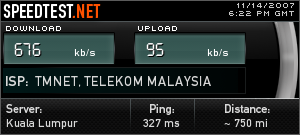
The result after I got the HSDPA signal
It will start with the download test first and then it runs the upload test. After both tests are completed, Speedtest will display the result in .gif image which you can use to share on your website or in forum.
Who is Hosting This is a website that enables you to get information about who is hosting any website. You just enter the domain name in the form and click on ‘tell me’ button. In a snap, Who is Hosting This will tell you who is the hosting provider.

My hosting provider is Internet-Webhosting but they put my website at US datacenter. That is why it shows Layered Technologies Inc in the result. 🙂
Find Out Who Is Hosting A Website [via Techie Buzz]
It is really amazing when only in two days, my new website has been listed in Google search result. I was doing some research about Nseries blog and suddenly I saw my new website, My Nseries Blog, which I registered the domain on 5th November has been listed in Google.
I use the keyword “nseries blog” and found my website at the 8th rank in the first result page. It is really fast for Google to detect new website and I hope this website will get good PR so the rank will be higher in the future.
My Nseries Blog is my new and my 5th website which will focus on Nokia Nseries phones. This website is currently in development and there are many things need to be improved. The current theme is K2 but it is just for temporary only. I will using my own custom made theme next month because I don’t have time to create one now. The categories are not yet decided. If you have any idea, please email me or leave them in the comment below. Right now, I am thinking to categorize them by models and each model will have their own sub-category such as tips & tricks, applications, themes, etc.
I just noticed today that I am using the new version of Gmail. I noticed it when I saw my email address is being displayed at the title bar. You will not see this if you are using the older version.

Then, to make it confirm, I saw beside the Settings, there is a link to Older Version. I clicked it and it sent me to the older version and there is no email address being displayed at the title bar.

Then what next? I went check out the new features like the Contacts manager, the More Actions drop-down menu, Chat.

Contacts Manager

More Actions menu
Chat popup