Happy Malaysia Day to all Malaysians… -CypherHackz-
I have been using P1 Wimax since August 2009. Personally, it is the best Internet broadband that we have in Malaysia. For Home Plus package, the average connection speed is around 120kbps-170kbps. But there were a few times where the speed dropped to 20-50kbps, and even sometimes it disconnected abruptly. If you got problem with P1 Wimax connection, feel free to read my article on Apabila P1 Wimax Bermasalah at BlogAku.Net.
The purpose I write this post is to help you to secure your P1 Wimax WiFi modem. It is actually very easy for unauthorized users to gain access into your P1 Wimax network if you did not change the modem default password, WEP key, and Access Control List. In this How-To guide, I will show you the step by step on how to secure your P1 Wimax WiFi modem. Let’s begin…
Change the default password

Change P1 Wimax modem default password
By default, the username and password for P1 Wimax modem is,
Username: admin
Password: admin123
Please change the default password before someone else gain access to your modem and change it for you. To do that,
- Go to http://10.1.1.254 by using your favourite web browser.
- Enter the default username, admin, and password, admin123.
- Click on Personalization at the top left of the page.
- Enter your Old Password, admin123, and New Password.
- Click Apply.
If you’ve changed the P1 Wimax modem password previously and forgot the password, you can reset it back by following my guide here, How to Reset P1 Wimax Modem Password?
Change WiFi WEP key

Change P1 Wimax modem default WEP key
After you have changed the default password, you also need to change P1 Wimax WiFi WEP key IF you are using DV230 modem. The modem is look like this,
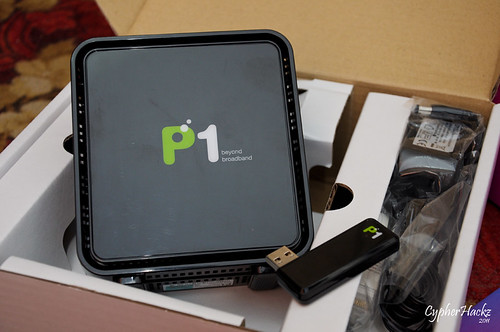
As you may already know, by default P1 Wimax DV230 modem WiFi is using WEP key that is easy to guess. For an example, let’s say your P1 Wimax WiFi SSID is 056789. If the user didn’t change the default WEP key, the key is 567891FFB0.
SSID: 056789
Remove 0 at the front, 56789
Combine with 1FFB0, and your P1 Wimax WiFi WEP key is: 567891FFB0
To change the default WEP key,
- Go to http://10.1.1.254 by using your favourite web browser.
- Enter your username, admin, and password.
- Click on Networking at the top right of the page.
- Click on WIFI.
- Click Next.
- Under Use Default, choose User Defined.
- And change the WEP key under Security Setting.
- Click Apply.
Note: Please ensure to follow these rules to set your WEP key.
64 bit
- 5 ASCII characters (A-Z or a mixture of A-Z and 0-9)
- 10 Hexadecimal characters (0-9, A-F or mixture of both 0-9 & A-F only)
128 bit
- 13 ASCII characters (A-Z or a mixture of A-Z and 0-9)
- 26 Hexadecimal characters (0-9,A-F or mixture of both 0-9 & A-F only)
Only allow specific MAC addresses to connect

Only allow specific MAC addresses to connect into your WiFi network
Even though you have changed the default P1 Wimax WEP key, there might be some possibilities where someone can crack the WEP key and use your WiFi connection without your acknowledge. To prevent this, you can set your P1 Wimax WiFi modem to only allow specific MAC addresses to connect into your P1 Wimax WiFi network.
Let’s say your iPhone MAC address is F8:1E:DF:43:49:A9.
- Go to http://10.1.1.254 using your favourite web browser.
- Enter your username, admin, and password.
- Click on Networking at the top right of the page.
- Click on WIFI.
- Click Next.
- Scroll down to ACL-setting.
- Choose Allow only following MAC addresses to connect to wireless network.
- Under Access Control List, enter your device MAC address. Eg: F8:1E:DF:43:49:A9
- Click Apply.
After the modem rebooted, only your iPhone can connect to your P1 Wimax WiFi network. Even though your neighbours can crack your WEP key but they can’t connect to your WiFi because their devices’ MAC addresses are not registered in the Access Control List.
I hope this simple How-To guide will help you to secure your P1 Wimax WiFi modem. If you have any new tips or info on how to secure P1 Wimax modem, feel free to share with us by submitting your comment below. Thank you and good luck!


how we can fine the MAC address at the lapt0p?
* fine = find
Start > Run > and type “cmd” > Enter
In the command prompt, type: ipconfig /all <enter>
Your MAC address is under Ethernet adapter Local Area Connection – Physical Address.
In the Access Control List, you can only put 8 users. How to add more users?
Sorry, it only allows 8 maximum users.
i forgot the password [admin123]..how can i reset the password..?
You have to reset the modem. There is a tiny hole at the back of the modem. Use pin or paper clip and press the button about 5-10 seconds.
u are just awesome!! someone have been using my line till it exceeded the limit…you are considered as my saviour..TQ for your kindness info
Glad you found this article helpful.
helo CypherHackz
need some advice here..can we change our p1 WEP key more than once??and if yes, how can we login into http://10.1.1.254 after we change the {admin123} password??Thankz for yor time!!
Yes, we can change our WEP key more than once. And you still can login into http://10.1.1.254 but using the same username and the new password.
May i know how to connect he DVR using P1 and what setting have to be set before use…
Sorry Chua. I don’t understand what do you mean by DVR?
Sorry cypherhackz, is it true that our MAC address is under Ethernet adapter Local Area Connection – Physical Address? because already tried my specific MAC addres and can’t access the wifi. and i checked it again(using netcut) that my physical address is on wireless LAN adapter wireless network connection. Under physical address.
Make sure the MAC address that you choose is the one under “Ethernet adapter Wireless Network Connection”.
From what i read, based on your article, doing the above methods will prevent unauthorized connections using the Wireless LAN, am i correct??
So, is it possible to prevent unauthorized connection using the LAN Cables as well??
There are 2 physical address, from what i see in Command, so, does typing the address from the Ethernet LAN (Not the Wireless LAN), into MAC can prevent unauthorized connections??
TQ in advance
I don’t think you can prevent the LAN access using the above method. Because that function is only to protect access for wireless connection only.
1)my MAC is the physical address under Ethernet adapter Local Area Connection or Ethernet adapter Wireless Network Connection? you answer rhiey’s question in the article Ethernet adapter Local Area Connection but then you answer kid’s question Ethernet adapter Wireless Network Connection
2) i would to make my p1-wimax as local access only without the access to the internet..how to do it?
when i type ipconfig/all in the cmd, i only found wireless LAN-wireless network connection & Ethernet adapter Local area Connection & Tunnel adapter Wireless areaConnection but i can not found Ethernet adapter Wireless Network Connection as you said..
Muazam, it should be Wireless Network Connection.
Whats with the WPS? do we have to follow the security mode so the connection setup for the MAC address works or just leave it alone/ignore it? Thanks btw
I’m sorry… What do you mean by ‘WPS’?
dude,i forgot my password,how?can you help me?
Just reset the modem, and use the default username and password to login.
nvm with my question up there,its already been answered..my new question is,im using the white modem,and i cant change my WEPKEY,can you help me please?
I’m using the white modem too. What error message does it give when you try to change the WEP key?
aku nak complain.kenapa p1 sekarang mcm sial,line slow.aku ambik yg 30gb da,tapi line slow gler,mcm sial.sebelum ni ok.aku ingat aku nak tukar streamix plak,p1 not good..
Try read my article here: http://www.blogaku.net/archive.....ermasalah/
hi..nice advice!!
1)as we know, p1wimax can afford up to 8 users, how to make p1-wimax moden as router@network hub(to play LAN game) without the access to internet?
2)why is my connection is low? i hve place it at the window and i live in kl
3)how to change its dns?
why is my ethernet-local-physical address is different from mac address stated in 10.1.1.254?
Hi!
1. Just connect to the WiFi router. Me and my friends have done that without any problem.
2. It depends on your location. You should report to P1 and raise this issue.
3. Double click the network icon on your taskbar, Properties, TCP/IP > and change your DNS from there.
4. That one is MAC address for the P1 modem and not your Ethernet card in your PC/laptop.
how to make my wimax as local connection only without the access to internet? it is possible?
came nk reset modem p1
how can we detect if someone not a household is using our broadband?can we do that
salam, i have tried to change my wep password, but after i changed it i couldnt connect to internet anymore..may i know why and how to overcome this?it seems i entered the password wrongly (but im sure the password is correct). if it was the case how to reset it back?
You can reset the password back by resetting the modem to factory settings. No problem.
i have a greenpacket OS Series outdoor modem i got from DirectOnPc using 10.1.1.254 web interface and default passsword is Admin Admin but i later change it to my own password because of Unauthorised person in my office.
Unfortunately, i can not remember the password i change it to again ..meaning that i can not no longer login to web interface using 10.1.1.254. i took the modem device back to my ISP to reset it back to factory setting as there is no button under the device to reset it myself..
Please is there any software to detect my password and username or to reset it back to factory setting for the new configuration
or how can i log into the modem
HERE IS THE DETAIL OF THE MODEM
HERE IS THE INFORMATION WRITING ON THE GRENPACKET OUTDOOR DEVICE
MODEL NO: WIXS—–168_VO1
MAC ID: 002682ECA720
190-DOS-8400R-RoHS
AND THIS WAS WRITING BELOW 48VDC=====0.35A Made in Taiwan
unwired
thank you
hi! may I ask if I already set up my connection to access control list or ACL, cellphone with wi fi is possible to connect? how to register to ACL my cellphone with wi fi…. thanks!
You must get your cellphone wifi mac address, then enter the mac into the ACL list.
Hi Cypher,
Great write up on the security. Is it possible to secure both PC and iMac on the ACL setting? I have secured my mac and ipad, i tried enter my pc’s ip and the reply was of course “invalid format”.
Hope there is a way to get around it!
TIA!
You should put your PC’s MAC address (physical address). Not the IP address.
Yeap! You strike me again! Once again, thanks for your speedy reply!
Keep up the good work!
hi! may I ask if I change also the name of SSID to my personal name, for example my SSID name is 45DFG687HJ and I change to my name as paolo@28… if possible how to do it?
1. Go to http://10.1.1.254/, login.
2. Click on Networking.
3. Under Use Default, choose User Defined. Next…
4. Change your SSID under Common Settings area.
better yet. change encryption to WPA. WEP is considered insecure. hackable in minutes with a proper network tool.
Urgent!!
i forget my P1 wifi password.. how can i solve it?
Hi there,
I’m new to P1. Its been my first week as a new user. The first few days was smooth and the connection speed was great up until recently. The speed dropped to around 50kbps-140kbps. Its insanely slow. I have applied for the 2MBps package. But I’m getting terrible speeds. I have also hooked up a range booster router. Does the router have something to do with my internet speeds? I’m guessing no. But I would like your opinion as well. Thank you