If you want to use Vista icons without installing Vista Customization Pack, maybe you want to try this method. [tags]vista, vista icons, icontweaker[/tags]
- Download and install IconTweaker. (Don’t worry. It is free. :d )
- Then, download Vista icon pack.
- Extract and double click the icon theme to install it.
- Once installed, click on Vista icon in IconTweaker and choose Load Theme.
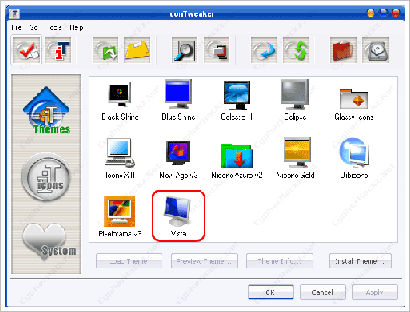
- Finally, click Ok. Done!

There are two more icon packages available for download. Ubuntu and OSX. Try them too. ;))
Ahh…want to change your Windows XP cursors? Go here please, Vista Cursors for Windows XP. :d
Cypher: Actually, I don’t want to install Vista but I like its icons. :d

Hmm, interesting…shall give a look again after exam 🙂
i really like vista icons i’m currently using. you better try them now. :d
Cool thanks, i was looking to get vista icons for my pc, i already have looney theme which makes my pc look like vista except for the missing icons.
i should try this icons..actually vista OS requirement very high why not try vista’s icon.?
Nice software man .
Funny.. I had already downloaded a Vista Skin and now to complete it with Vista Icons.. just beautiful. Thanx;)
[Comment ID #43785 Will Be Quoted Here]
nice… i still using crystal theme for my windows xp. don’t want to change it yet. he3.
[Comment ID #43799 Will Be Quoted Here]
you should try them now. coz it is really cool. i really like them. :)>-
[Comment ID #43912 Will Be Quoted Here]
yup! and it is free… :d
[Comment ID #43923 Will Be Quoted Here]
no problem. but, have you change your cursor to vista?
Alienware Icons are cooler! xP
do mind share with us where we can get the icons?
I actually got the skin/icon package. with my version you can pick if you just want the icon or the skin. I’m not sure if it’s the same with the newer versions.
http://theskinsfactory.com/skinsfactory/?page=portfolio_view&portfolio=3
Everything is backed up and you can revert it if you want at anytime I believe..
Beautiful tutorial! Works perfect. Thanks a lot. 🙂
sure. no problem. thank you. 😉
Nice article!
The links seems to be broken could you give new links
or send them.
the links no longer works for the vista icons pack!thx though
I downloaded vista icons but could not install it.
plz tell me how to install vista icons in windows xp
I have uploaded the icon pack on my googlepages. So you can download the pack now. Sorry for any inconvenience.
#srinivas – The instruction is on this post. 🙂
This just completes the package, just last night……i downloaded A Vista Visual Style, that makes my taskbar look like Vista…taskbar [ without the transparent thingy ] .. So I downloaded Transbar.. a free software…. that adds transparency to your taskbar.. . Another program called YzShadow.exe just google this two softwares……Their both free.. It adds transparency to your startup menus & drop down menus….
And than to top it off with Vista Icons……My actually thought i downloaded Vista OS …HA HAHAHA HA LOL..
aNEWAY
Thanks for the Vista icons packs
very good so good
how to delete comments??
if yes can you delete the comment i replied on please thank you
The vista icons r pretty good. How about putting it to the limit- getting some that moves, and some vista dialoge messages including logon\off ,transfer,confirm delete etc. , if its not too much to ask for. thanks:-D
Hi. The links for OSX and Ubuntu icons are dead. Any ideas? Thanks@
I am sorry. I don’t have the backup file. If not I can upload it to Goolgepages.
i tried to download the icontweaker but it says:
HTTP Error 404 – File or directory not found.
whats rong?
i liked very much
Very good!!!
I had already installed a vista theme. After this it really looked like vista. My Uncle asked me “When did I install Vista on my PC”
AWSOME…………..!!!!!!!!!!!!!!!!!!!!!!!!!!!!!!!!!!!!!!!!!!!!!!!!!!!!!!!!!!!!!!!!!!!!!!!!!!!!!!!!!!!!!!!!!!!!!!!!!!!!!!!!!!!!!!!!!!!!!!!!!!!!!!!!!!!!!!!!!!!!!!!!!!!!!!!!!!!!!!!!!!!!!!!!!!!!!!!!!!!!!!!!!!!!!!!!!!!!!!!!!!!!!!!!!!!!!!!!!!!!!!!!!!!!!!!!!!!!!!!!!!!!!!!!!!!!!!!!!!!!!!!!!!!!!!!!!!!!!!!!!!!
Niceeeee!!!!!
BAKVAAAAAAAAAAAAAAAAAAAAS………….!!!!!!!!!!!!!!!