By default, Huawei E220 can only support up to 3.6Mbps speed. In Malaysia, 3.6Mbps is the top speed that 3.5G broadband users can get. But the truth is, it is just a fantasy. No one will get that speed.

By default, Huawei E220 only can handles 3.6Mbps connection
I even asked Celcom technician to do speedtest at place. Do you want to know how much speed that he got? Only 1.2Mbps. And the test was done in the morning (at low peak time). And when I asked why he only got 1.2Mbps and not 3.6Mbps or even 2Mbps? Here is what he replied,
“This is because our server can’t support so many users. If there are many users use the Internet at one time, the slowness will happen.”
Duh…what a very frustrating answer. Why don’t you guys (Celcom) use our money to upgrade the server? It is better than hearing our complaints every minutes and seconds.

But this “hack” can make it to 7.2Mbps
Ok, back to the article. How you can “hack” your Huawei E220 USB modem to make it supports up to 7.2Mbps speed? By default, Huawei E220 will only can operates at 3.6Mbps. But by doing this “hack” you can make it to operate at 7.2Mbps.
Before we can proceed to “hack” our Huawei E220 usb modem, I must give some advices first. Please don’t do this “hack” if,
- your device is still under contract or warranty
- you don’t want to get into troubles if something goes wrong
- you don’t want to make your Huawei E220 supports 7.2Mbps speed
Disclaimer: I will not responsible on anything you do or happen to your Huawei E220 USB Modem.
Now, to do the “hack” is really simple. First what you need to do is to backup all files in the Huawei E220 USB modem to your computer. I forgot to copy the files and I have lost everything. So my advice, make a backup all the files into your computer hard drive. DON’T do the same mistake like I did.
Now go to Mobile Connected website and download firmware 11.117.09.00.00. The download link is at the end of the article. Download it and run the update file. Follow the screen and make sure to tick “Forced Download”.
The download process will take awhile and you will see the green light blinking rapidly. Once the “hack” is done, you will see your connection is able to support up to 7.2Mbps like the image I put in this article.
Again, in Malaysia, we are provided with 3.6Mbps only. This 7.2Mbps is only available in UK, US and other first and second world countries. So, even though you do this “hack”, it doesn’t mean you will get faster broadband connection.
Update the Dashboard
But if you want to upgrade the dashboard application (Mobile Connect), you can do so by downloading the update from Huawei download page. Choose the latest version (the latest date it get published). After the download is finished, open the archive and run the file.

Mobile Partner in action
This new version is using Huawei Partner and not Mobile Connect anymore. I don’t know why they choose Mobile Parner. For me, Mobile Connect is much easier to use and give more statistics details. Or maybe they decided to use Mobile Partner because it is faster to locate what services available around you. That is the only improvement I see after the “hack” is done.
But if you found other improvements in this latest firmware, please drop it into the comment form below. So I can check from my end too.
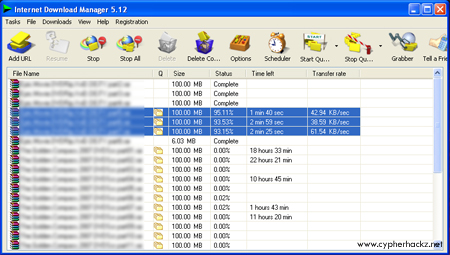
Edit: Here is the screenshot taken while I was downloading files using Internet Download Manager.

bro firmware for sierra 875u dun have ah?
aku mls gila nak cr…hehe :p
Sorry bro. I don’t know where can I get the Sierra firmware. :p
I wonder how 7.2Mbps feels like. Must be heaven for Malaysian bloggers if TMNet can offer that high speed.
Yeah, for sure it is like a heaven for Malaysia bloggers. But when will TMNet want to provide 7.2Mbps? Even 3.6Mpbs they still terkapai-kapai. Heh!
bro’ leh include screenshot bandwidth test or torrent download? Thanks!
3.6Mpbs, heh… this is Malaysia dude. we aint to reach 3.6Mpbs also in this 3 years…idk uggh uggh
aritu aku’y torrent bley ‘cicah’ smpi 130kb meh…tp sekejap je ah…pckage d68
my one is alredy connect with 7.2 mbps.
but my ISP max bandwidth is 1Mbps ( thast my package )
is there any ways to improve this? ( without changing my package !!!)
thanks
bro, how can i setup this modem into my Fedora Core 7?
i got some tricks, but thats not working.
any ideas? plsssssss
wah2!!! laju jgk
so masalah ko yg terputus2 connection tu dh setle????
takut gak nk upgrade kalo ade prob camni
i did the mistake as u did.. forgot to backup all original data..
secondly, i didnt tick “Forced Download”, will thr b any problem is i didnt tick it? my modem now still working as usual…
hello, can u do this for the vodafone (Huawei e220) VMC Lite too?.
Not sure mate. I don’t know whether the vodafone can upgrade the firmware to 7.2Mbps or not.
hi fren. i just bought tht usb modem from maxis. man i’m really envy the download speed u got. mind telling me how come the hacked huawei can’t over come server traffic control>??? thnk man!!
Hello anyone know where I can get any unlock software for the E220.I am on tMobile and I know you can unlock it but where to get the software?
Thanks peeps
Bro ihave the update but its say so such modem found on my laptop apasal eh. Even while the downloading in pfogress. Can yoou help me.Much appreciated.
I’m using USB modem model E220-Vodafone(Celcom)
My problem is the download speed only reach 9-15kb/s
Can i boost my download using ur above method
My current download speed is really suck
Worked fine here in Oman. My modem now connects at 7.2gb
Thanks.
ps. The software was left intact although I did back it up just in case.
Here tip for those forget to backup your file. I heard that upgrade using 7.2 speed will cut ur line sometime. so here the tip, simply visit this web http://www.vodacom.co.za/services/mobile_data/downloads.jsp
and select
Huawei E220 USB Modem (HSDPA)Downloads
File Size
Firmware – Update Microsoft Windows 6.24
Your connection will turn normal as new as u buy it.
P.S. I m am a man who love helping mankind
I purchased CDMA USB modem. during downloading the software i receive below message, ‘ the software you are installing for XunChang CDMA modem has not passed windows logo testing to verify the compatibility with Win XP’. Is there a way to ovecome this problem, other than throw it away?
Thanks
Yo bro….. my huawei E220 tk blh auto connettion lah…..
tolong jap…. bro modem panas, masalah ke tak…………
mitk tolong
my celcom modem (Huawei), signal die slalu trputus, putus
tp tkla sampai terdisconnect (cume die brenti je)
camne nk boost die punye speed ye, n supaye die tk asyik 0bps jer
thnx!
the truth, no matter how u hack ur modem till u get 7.2m or more, u will still get the same speed rate like other users.
the worse thing if the software not suitable with ur modem, will get an error or get pretty slow.
this is my usage for info:
when at my home download (bitcomet) speed 1-5kbps, surfing speed 20-80kbps.
when at my office (near the celcom Pencawang), download speed 50-120kbps, surfing 300-500kbps (sometime can get 800kbps, youtube not even stuck once).
but when hit the limit (5gb usage), its like using dial-up modem the time before streamyx~ xD
my package rm68 limited 384kbps, no hacking tools or device. my workmate rm98 unlimited 3.6mbps, but we hav the same speed rate. LOL~
that means it depend where ur place got better coverage or worse~
hye i need help,
Tis morning i changed my maxisbb 3.6 to 7.2 Now i cant even play online game, my rate sent n recieved so low (sent 2.1kbps and recieved 1.7kbps).
i am wonder..
Is tis maxis problem or tis hack?
I purchased CDMA USB modem. during downloading the software i receive below message, ‘ the software you are installing for XunChang CDMA modem has not passed windows logo testing to verify the compatibility with Win XP’. Is there a way to ovecome this problem, other than throw it away?
Thanks
I think it should be no problem working with Windows. Just the company does not send their product to Microsoft for compatibility testing I guess.
Dun, can I use that website to download latest application software?
I Try to upgrade my firmware version, but it still 3,6 Mbps
hi guys
my huawei E220 HSDPA USB Modem only run one sim card type i meen one telcome co.
e.g\ t – mobile sims only
how to make modem run other sim cards
anyone help me! bagaimane nk dpt software download lagu,video tanpa perlu bayaran. Juz FREE!! download
This worked a treat!! I had my old E220 taken for repairs and they gave me a new one. There were connection issues, slow as hell and wouldn’t allow me to download certain stuff, this fixed it all! Thanks CypherHackz!
Also, has anyone used the new dashboard software? I’m still using the mobile connect and may upgrade it, but I want opinions first.
Neeed Help to get e220 work on my linux. I did some of the tips found on the net but still no connection
has anyone tried this..???
Quote from Dun :
Here tip for those forget to backup your file. I heard that upgrade using 7.2 speed will cut ur line sometime. so here the tip, simply visit this web http://www.vodacom.co.za/servi…..nloads.jsp
and select
Huawei E220 USB Modem (HSDPA)Downloads
File Size
Firmware – Update Microsoft Windows 6.24
Your connection will turn normal as new as u buy it.
P.S. I m am a man who love helping mankind
bro.. my modem already 7.2.. i have problem with torrent.. no connection.. plssss bro help me…
How can I unlock my Huawei E220?
I already have the 7.2 Mbps but I need to be able to use another sim card from a different ISP (not Vodacom)
hi camana nak setelkan my problem nie..dah dkt semggu my E220 tak leh connect kat my laptop.kalu bawak p opis leh lak..
dia akan kuar this type of msg ==> a connection to remote computer could not be established, so the posrt 4 this connection was closed..dah puas uninstall n install balik n macam2 lg trobleshooting yg dibuat but still unsuccessfull.
plz help me yg tak berapa nk reti ni..thanks..
Maybe network at your home got problem. Have you consult with the Celcom care?
bro,
aku pakai maxis broadband ni dah sebulan lebey gak – umah aku kat balakong so aku dpt signal hsdpa..
bile connect mmg dia tulis 3.6Mbps tp bila aku wat speedtest dpt dlm range 700Kbps ~ 1.5Mbps je tp tak kisah la sangat psl speed camtu browsing dah bole celen streamyx 1Mbps..
so far aku dah try kat opis aku ok dpt 3G, gi jb pun ok gak dpt hsdpa, balik kedah pun bole pakai lg (GPRS je la)
tp yg aku paling tak puas ati biler download – aku download software (mcm WinZIP @ WinRAR tp lg best & free – mmg rating no 1 kat CNET) ni 3.6mb je tp transfer rate aku just 0.1Kbps ~ 2Kbps je..
aku rasa aku start download dr kul 5 ptg td sampai skang ni (12.03am dah) pakai star downloader pro tp tak siap2 lg..mata dah kuyu ni..
kalu aku upgrade firmware ngan dash app tu bole increase download speed tak?
satu je yg best skang ni – line tak intermittent langsung!
pikir2 balik, streamyx 1Mbps br RM77..aku nyer broadband RM118 – speed lebih kurang je lak tu..maner aci kan???
quote from zeef:
bro.. my modem already 7.2.. i have problem with torrent.. no connection..
kalu maxis mmg takleh pakai p2p nyer software (fair usage policy) sbb taknak network crowded
pada smua kwn2,
aku nsihatkn Jgn la upgrade modem E220 from 3.6 to 7.2…
aku dh upgrade & mmg dpt speed 7.2…
tp network slalu teputus tiba2..byk org komen ttg ni….
xguna upgrade….modem cepat panas…
last2 rosak modem aku..nasib baik la still under warrenty..
xguna speed 7.2,lg pun
kat m’sia ni setakat speed 3.6 je yg mmpu diorg bg..
tu pun xsmpai 3.6…
jgn trperdaya dgn kata2 org kt forum ni…last2 diri sndiri yg rugi…
Hi ,
after u did the hacking , does it work on any network ?
i have this model and its work in one operator , i want it to work in all operators
I think it happens to you because you bought the device from the operator. Some operators have hacked the device so you can’t use it on other operators.
Alooo,
aku ada tgk plan celcom RM68 348 kbps tu nak try jugak ni…aku nak guna untuk main game online cam DOTA, RYL2 etc. Ada saper2 kat sini yang penah main game2 online guna package celcom tak? Macamana lagging teruk ker??? Ada sesaper yang nak jual modem Huawei tu tak??? jual kat aku lah JB area 😀
Have an E220 modem bought in Angola for Unitel network. With the Unitel SIM in I can see Vodacom, MTN and Cell-C (S.Africa) but no connect. Not a problem.
Updated the Dasboard and am running Mobile Partner – works fine in Angola, but when inserting a Vodacom SA SIM I get the message {SIM/USIM Not detected} – Seems it does not like the 32K Vodacom Sim cards. Had the SIM in at the Vodashop and they say it is OK. How do I get this going on Vodacom as well?
I use Celcom broadband 384kbp Huawei E220 already 5 months,the problem is low network coverage.
-not able to play online game
-if down load a movie of 400mb it’s 2days to complete…some time even unable to complete. (send rate 53kbs & receive 30~60kbs)
I live in Air Itam (Farlim) Penang can any tell me is there Celcom coverage zone. Any advice what can I do?
im using the maxis broadband, and it’s really helps me a lot!
thank you, btw, im looking for the dashboard feature, which one is should is the file?
can u give me the direct link plz?
i think it’s also compatible with maxis broadband isn’t it?
thank you!
😉
hey guys i just start using Celcom Broadband 2 weeks ago. It really made me mad that whatever i click it hangs up for few minutes sometimes it never open the page.!!!
fed up with what was told.Im living in Melaka(Tehel) though i know its out of 3G so called territory , but i heard its fast even with GPRS.
So which one to trust?… where to complaint about the connection as the celcom website itself hangs up for so long..??
anyone can help?
GPRS is slow. I am sure you will really mad if the network you are in is GPRS.
Jgnla korang beli broadband maxis ke atau pun celcom, sume hampeh. aku dah pakai dua-dua. Harapkan bulan2 je fees dia mahal tapi network cam sial. baik pakai stremyx kalau yg tak g mane2. tu pendapat aku la.