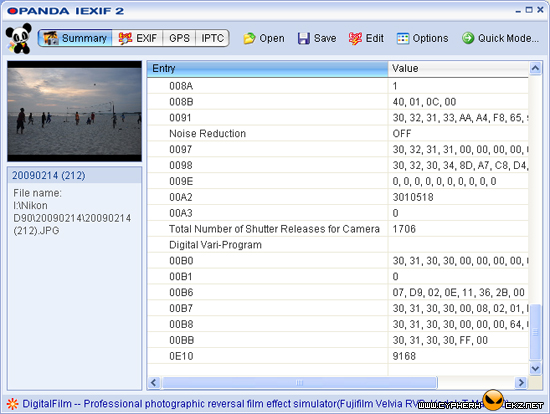
The reason why you should check your DSLR shutter count. Do you know, DSLRs have their own life time? It is based on how many counts of the shutter releases. When you exceeded the shutter count limit, it is time to change your DSLR with a new one or replace with a new shutter.
Almost current DSLR models put the shutter count information inside the pictures. The information is located in the pictures metadata and can only be viewed by using special software like Opanda IExif .
As you can see at the above image, the shutter count for that picture is 1706. But that picture was taken on last two weeks ago. My latest shutter count is 2096. Still young and virgin.
After you have downloaded and installed Opanda IExif, right click on your latest picture taken with your DSLR, then choose “View Iexif\GPS\IPTC with IExif”. Scroll down until you see “Total Number of Shutter Releases for Camera” and you will get your latest DSLR shutter count value.
CypherHackz: Do not know what is my Nikon D90 shutter count limit.

ada juga dengar pasal ni lepas beli eos 1000d dulu…tapi sampai skrg say tak tau berapa limit kamera saya…skrg dah guna dekat 8000…baru 4 bulan guna…
…unfortunately, I had tried it with my Konica Minolta few months back and it doesn’t work for me
#firdee – Wow! Very fast… Do you have Flickr account?
#Wing Loon – Maybe only Nikon put the information inside the picture. Not sure buddy.
Nikon D90 shutter count limit appr. 100,000
#man – Thanks for the info mate.
Never knew about it before. Nice info CypherHackz. What actually happen if the shutter count limit is up? the camera will be dysfunctional or what? I still have friends that have their aged rebel xt model and their shoots just fine until now. By the way, their use it extensively and for sure their shutter hits limit is up.
Opanda IExif mcm compatible utk Nikon je. Camne kalo nk tahu Shutter Count utk Canon?
Opanda IExif seems compatible with NIKON. How to know Shutter Count for CANON?
Check this out! Check your camera shutter count online
http://www.myshuttercount.com
Many peoples still do not understand what does this shutter count do. huhu~
apa yang saya dengar…kalau satu camera itu telah mencapai shutter count limit ia perlu diformat dan kos untuk format sama dengan kos membeli body camera yang baru…sebab itu, orang yang nak membeli
2nd hand camera akan tanya berapa shutter count…
i already installed opanda IExif. unfortunately, I can’t see the total Number of Shutter Releases for my Canon 450d. How can I see it? Is that Opanda is for Nikon users only? Tnx for the quick response.
I have tried with pictures from my Sony a700 and Nikon D3 and it doesnt show the shutter count on either of them
D
I just bought a second hand d90, but the last owner claim that the shutter was just service and show me the service service resit, and the resit showed that the sutter was replace with a new one, does this mean that it will reset the count also?
I don’t think the shutter count will reset to zero. Because the info is stored in the camera system.
Great web site you’ve got here.. It’s difficult to find
high quality writing like yours nowadays. I really appreciate people like you!
Take care!!
i just bought a really neat d90 second hand for 320 $ , the seller told me count is 30,000 but now i cheked its 14,000 , it still has 6 month warranty , should i be worried ?