It is quite annoying when each time I open a new tab in Firefox 3.6, the new tab will be opened next to the tab I’m viewing. I don’t like it very much. The new tab supposed to open at the far right of the tab bar like in the previous Firefox versions.
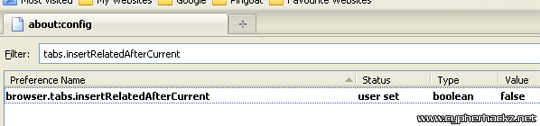
Luckily, I found the solution on how to fix that.
- In the address bar, type in:
about:config
- Filtering the setting with:
browser.tabs.insertRelatedAfterCurrent
- Lastly, double click the preference name to change it to ‘false’.
You don’t have to restart your Firefox 3.6 as the change takes effect immediately. If you want to switch it back, just change the setting back to ‘true’.

Thx for the tip. It really saved me 🙂
Thanks so much…
I am still more comfortable using Mozila Firefox 3.5
mozilla firefox top web browser……!!!
Sweet! Thanks a ton– this was annoying the heck outta me. I’m glad I didn’t have to install a whole new addon just to fix it.
Let me also add my thanks. This was just getting me pi..ed off. Why do developers just decide to arbitrarily change things after they’ve been working fine?
bgus2, mff versi terbaru mmg pelik sket..
One more bit of thanks added on to the pile – I was going nuts.
I, for one, actually like the change in FF3.6. It suits me better.
Thank you, thank you THANK YOU!!!
Or you can try Chromifox Extreme 3 from Mozilla add-ons https://addons.mozilla.org/en-US/firefox/addon/10674
Many thanks. Was so annoying!
I’m sorry, but I prefer the new behaviour!
LOL people still use Firefox?! Get with the times and use Chrome or even Opera.
Thank you! It’s so annoying when software gets changed up like that, for no reason other than to confuse and annoy previous users!
Thanks, that was driving me nuts, too! Default tab behavior setting in the new version should have matched the old version. Firefox should let the user to change to the alternate tab behavior, not have the user download the new version and “poof!” new tab behavior.
waw thanks..I tried a new u were right ..
I am currently using Windows XP and just started to explore Windows registry manipulation. I was looking around the Internet when i read about how to edit windows registry article. Using the instruction from this article I started tweaking Mozilla Firefox. By editing registry keys I was able to install Mozilla and its extension.
already moved to chrome 🙂
Thanks, very helpful
I like open new link next to current tab.
i didn’t notice it until you mentioned about this, to be frank it is annoying. thanks for he tip.
yup nice tip… but this blog are not updated anymore… i wonder where is the owner gone???
Wow so many cobwebs. Better shut it down, save bandwidth.
i prefer more that the tab will opened beside the current tab, easier for me, i think
No, it’s SUPPOSED to open to the right of the active tab, in my world at least.
So thanks for telling me what I needed to change to make it work MY way! No more trying to sift through tab related extensions to find one just to do this that doesn’t also break some other extension.