The software that I will review here is a monitoring software. I tested it on my PC which is a standalone PC and has Internet connection. I leave it runs in one day and records any activities performed on the PC. And here is the review.
Introduction
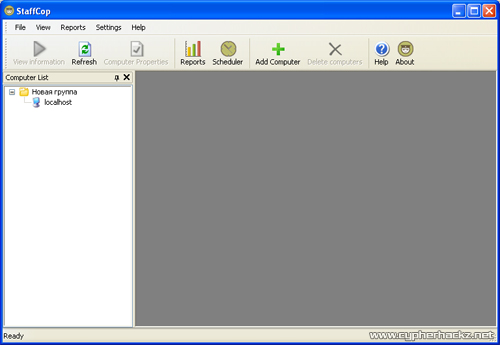
StaffCop is a network, computer and employee monitoring software. This software is able to record every single things that happens to your PC or your employees’ PC. Any applications they have opened, websites they have viewed, keystrokes they have typed, everything, will be logged into its own record system.
The main purpose of StaffCop is actually to monitor your employees’ activities during their work hours with the PC. So you will know, whether the person who uses the computer doing their work or just playing games or watching movies.
Installation
The installation is simple with its straight-away interface. During the installation process, you will be prompted to choose whether you want to install it for a LAN environment or just simply in a standalone PC. For this review, I just choosed to install in standalone PC.

After the installation is finished, you have to reboot the PC. But before I can reboot my PC, Kaspersky detects StaffCop as dangerous software. Based from the notification above, it says that this software does not have digital signature and we do not know what will happen to our PC if we continue using it. Because I trust this software, so I choose Yes and ignore the notification.

After reboot, you have to register the software. To do this, you need a valid registration key. Because I already have the registration key, so I register the software right away. And then, I found a spelling mistake in the message box. I also found more spelling mistakes in the Help file. I guess, the developer have to correct the spelling error before more people complaints about this.
Features
-
Screenshots Recording
-
Website Monitoring
-
Program Monitoring
-
Keylogger
-
File and Folder Tracking
-
Recording Instant Messaging chats
-
Monitoring USB Devices
-
Recording User Login and Logout
StaffCop is really dangerous. I tested it on my PC and it records every keystroke that I typed using my keyboard. For an example, there is a record which it saved my username and password that I typed to login to my Gmail account. Not just the username and password, it also shows you the link to the login page.
Another thing is, the instant messaging recording feature, it shows you exactly the conversation that have been made when you chat with your friend. In the log, I see my brother was chatting with his friend. Even the username of the person he chats too also been recorded. This is really a killer software.
But there is one problem with StaffCop. The images that were captured using the Screenshot Capture are not sharp. There are many noises and the images are blurred. The developer has to fix it or enhance this feature in their next release because I think this feature is really useful.
Conclusion
As conclusion, if I am the employee, of course I don’t want this software on my PC. But if I am the employeer and looking for software that can monitor my employees behaviour, StaffCop is the software for me. It is so powerful and I am sure my employees will comitted to their works.
The software price is $35USD for a single PC but there are many other license packages that you can purchase depending on how many computers that you want to install. So, whose PC you want to target?

this software is definitely dangerous. if it can record the username and password for every sites u logged into, hohoho… it might give the one who do the monitoring activities to access your bank account or other sensitive accounts…
gosh, if this happen to me and within my organisation, i’ definitely won’t use the computer provided by my organisation.
this software is a keylogger. A legal keylogger? 😛
A bit pricey to me. If you just want to record work + play activities, try RescueTime.
Hello, I’m from AtomPark and we are developers of StaffCop.
Thank you for the review and finding few spell bugs, we will fix them right today and update the program on site.
About non-sharp screenshots – I think you have to click ZOOM on the screenshot and it will become nicer.
For StuckS: StaffCop is not a keylogger; it records daily activity of the company personnel. Logging of keystrokes is only a small part of StaffCop features. Optionally, a system admonistrator can switch off any monitoring option at all.
mcm cool je ni. hehe
okay! mcm keylogger. wow! even StaffCop leaving a comment here.. the software sure great, if murah lagi la… ;p
Wait… you said this software records all the activities….Screenshots Recording, Website Monitoring, Program Monitoring, etc….
does this mean it require lots of disk space?
StaffCop requires not much disk space. It needs about 10 Mb a day if you record screenshots every 10 minutes and 5 MB a day if make screenshots every 20 minutes.
If you switch off screenshots, it needs only 1-2 MB / day.
Thanks Evgeny for the comments. Regarding the hard disk space, I think the company can do weekly maintenance or monthly to remove those unwanted screenshots. Depends on the company actually.
Moreover, StaffCop tracking agent deletes old logs when a Report Generator downloads them to make reports about personnel statistics.
Shit man! This software is bullshit! Kalau la bos aku tahu software ni, Habis aku!
That is why don’t use your company laptop or computer to do other stuffs.
cool
I purhcased SaffCop with 3 licenses. after much troubleshooting and little help from their support, i nicely asked for a refund. which they refused!!
DO NOT PURCHASE STAFFCOP UNLESS YOU WANT TO TAKE HOURS OF YOUR DAY TO TROUBLESHOOT A POORLY WRITTEN AND DEFECTIVE PRODUCT.
I am a network administrator and have 10 years of experience. i know my stuff and while this looks great on their website, it’s defective a waste of time and definitely a waste of money.
try other products where they actually SPEAK ENGLISH!! THESE PEOPLE ARE RUSSIAN!!!
I totally agree with angry. This company is a joke. I have ordered 7 licenses 2 weeks ago and still haven’t got a license key that works. They sent me 2 days ago and email containing the details of a different client. How is that possible?!?
PLEASE DON’T BUY. YOU WILL BE REALLY SORRY.
You – is it who? Software and registration code are sent AUTOMATICALLY by our billing system (it even does not depend on us!).
So, if it’s not a joke from the competitor (“angry too”), please contact me directly at em@staffcop.com or by skype at “medvednkov” to resolve the problem.
ada key percuma tak untuk software ni? kalo ader boleh beri kepada saya tak?
we prefer more “diligent” employee monitoring software that tracks the time but do not collect private data like screenshots\emails etc..
This product is trash. Don’t try e-mailing support either, they will absolutely not help you.
Its a perfect key logger record key stroke.And also capture screenshots.Very helpful for monitoring home and employee pc.