By default, Huawei E220 can only support up to 3.6Mbps speed. In Malaysia, 3.6Mbps is the top speed that 3.5G broadband users can get. But the truth is, it is just a fantasy. No one will get that speed.

By default, Huawei E220 only can handles 3.6Mbps connection
I even asked Celcom technician to do speedtest at place. Do you want to know how much speed that he got? Only 1.2Mbps. And the test was done in the morning (at low peak time). And when I asked why he only got 1.2Mbps and not 3.6Mbps or even 2Mbps? Here is what he replied,
“This is because our server can’t support so many users. If there are many users use the Internet at one time, the slowness will happen.”
Duh…what a very frustrating answer. Why don’t you guys (Celcom) use our money to upgrade the server? It is better than hearing our complaints every minutes and seconds.

But this “hack” can make it to 7.2Mbps
Ok, back to the article. How you can “hack” your Huawei E220 USB modem to make it supports up to 7.2Mbps speed? By default, Huawei E220 will only can operates at 3.6Mbps. But by doing this “hack” you can make it to operate at 7.2Mbps.
Before we can proceed to “hack” our Huawei E220 usb modem, I must give some advices first. Please don’t do this “hack” if,
- your device is still under contract or warranty
- you don’t want to get into troubles if something goes wrong
- you don’t want to make your Huawei E220 supports 7.2Mbps speed
Disclaimer: I will not responsible on anything you do or happen to your Huawei E220 USB Modem.
Now, to do the “hack” is really simple. First what you need to do is to backup all files in the Huawei E220 USB modem to your computer. I forgot to copy the files and I have lost everything. So my advice, make a backup all the files into your computer hard drive. DON’T do the same mistake like I did.
Now go to Mobile Connected website and download firmware 11.117.09.00.00. The download link is at the end of the article. Download it and run the update file. Follow the screen and make sure to tick “Forced Download”.
The download process will take awhile and you will see the green light blinking rapidly. Once the “hack” is done, you will see your connection is able to support up to 7.2Mbps like the image I put in this article.
Again, in Malaysia, we are provided with 3.6Mbps only. This 7.2Mbps is only available in UK, US and other first and second world countries. So, even though you do this “hack”, it doesn’t mean you will get faster broadband connection.
Update the Dashboard
But if you want to upgrade the dashboard application (Mobile Connect), you can do so by downloading the update from Huawei download page. Choose the latest version (the latest date it get published). After the download is finished, open the archive and run the file.

Mobile Partner in action
This new version is using Huawei Partner and not Mobile Connect anymore. I don’t know why they choose Mobile Parner. For me, Mobile Connect is much easier to use and give more statistics details. Or maybe they decided to use Mobile Partner because it is faster to locate what services available around you. That is the only improvement I see after the “hack” is done.
But if you found other improvements in this latest firmware, please drop it into the comment form below. So I can check from my end too.
Edit: Here is the screenshot taken while I was downloading files using Internet Download Manager.
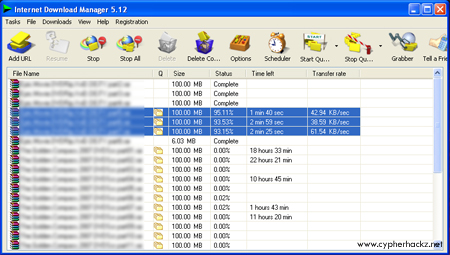

tipu ar celcom ni.
kte unlimited
awl2 laju pahtu lme skit,jd slow cm siput.
nyesal potong stremyx wt beli bband…
bodoh la… itu pasal tak baca dia punya quato. sebab dia jadi perlahan adalah dh lepas quato.
Kau la bodo, quato kepala bapak kau.
Quato quato quaot quato quato quato trololololololol
I am from Bintulu, Sarawak with 7.2Mbps Maxis broadband and under 6 months contract. Here, my average download speed is between 300 to 450 Kb/s (provided that it does not exceed download limit). But when I was in subang, my speed was at a freaking 700Kb/s plus (which is about 7.2Mbps). I download a 175Mb file in less than 5 minute. Obviously, your area is a factor to your download speed.
Hmmm…. ak punya limit 1GB s ekejapje dah sampai limit mereka send sms kat ak add RM12.88 +1GB, RM38.88 +5GB.. adakah harga ini mahal? sure pokai
–mrk limit connection teruk la…. sampai i cannot loading, nak cari bahan for assignment pun x leh.. i kena tipu cakap unlimited..ZZzzz
cel.com….unlimited tu celcom nak ko byar tambah pakej (quato) tu yg unlimited tu hik3…biasalah malaysia punya line semua nak mahal…line smpai host server dan payment method utk e-commence mahal giler pastu server slow….
bro, is there any way to make huawei e169 and e1762 support cdma ev-do ? Is there any hack to make these devices support cdma 1x or ev-do ?
hey bro do you know how to hack echo life hg510a plz tell me
hi, regarding for the hacking the speed of the broadband connection is it possible to Philippines to have a connection of 7.2Mbps..
firmware utk huawei E1550 bg support 7.2mbps ado x? xpun caro2 nak bg natang ni laju skit dari hok ada nih
LOL la kau ni…..aq pun pakai E1550 yg lembab cam tahik….tp nk buat camne dh abes quota….ROFL
iam using idea HSDPA 2100MHZ.THEY TELL THAT IT HAS 3.6MBPS SPEED BUT I DONT GET IT PLZ HELP ME TO INCREASE THE SPEED UPTO 3.6
kalau korang nak internet senang ikut mcm aq bwt neh
1.beli broadband yg jual kat shopping mall…alah yg made in china tu..aq beli creatiiv modem, 3.5g lak tu dan speed dye 7.2Mbps..btul neh aq x tipu..x pyah korang susah2 nak install software kat modem..harga dye aq bli rm140
2.korang bli digi internet turbo yang limited edition..sim neh senang x pyah register..harga rm25…dan sim neh reload rm10 dapat akses intenet 5 hari
3.dan yg best nyer aq dah jmpa cara nak melepasi kuota download 100mb sim neh..pasal sim neh asal dah download 100mb kelajuan download akan menurun tapi surfing speed tetap diberi 128kbps…dan limit speed download 100mb tu akan reset jam 12am…tapi aq maintain speeed download dgn idm maintain 50-180kbps…btul tak tipu…care dye aq post lain kli alrite
cam cite drama lak main sambung2. nk bg tau tu bg tau sepenuhnya dgn keilkhlasan yg x berbelah bg hehe 😛
aq rsa digi dah detect lah cara aq tu..sbb speed download sah tak stabil lgi…
lolz!! wei!! you think 3.6 mbps cant get that speed…you think no one else get that speed? YOU WRONG!!! I First get that speed without tweaking or hack…. i use celcom broaband rm98 per month…..that day i was on9 at 6.30++ am i was use IDM to download file like file game…u know how much speed i was get?? I get 4.9 mbps…this is no LIE… I forgot to capture that speed with camtasia….but in my ID show that speed 490.00++ kbps download… that time i download file about 500mbps…only need 20 minute do download..can u imagine that speed….but now speed so low..because my area is celcom user…so hard get high speed…always get high ping and letency…
apalah speed aq memeang 7.2mbps setiap masa..maksud aq apa yang kna detect adalah speed download jeh speed surfing maintain laju…kelajuan download aq pernah dpt 500++ kbps dngn sedikit tweaking…modem aq memang support 7.2 mbps lah lol….sbb 3.5g bknnya 3g….rupanya speed download aq akan kembali laju apabila aq cabut modem shutdown dan tnngu kejap dan on blik…aq x taw lah knapa tpi at least dpt solution..untuk surfing laju aq recommend korang pasng cfosspeed kat pc korang..pastu korang google sergiwa mediafire dan scan pc korang guna software tu sbb kdng2 ada malware tu yang melembabkan pc korang…dan guna firefox version 3 ingt version 3 bukan 3 something2 kat blakang..pastu korang install addon fasterfox 2.0.0,tweak network,adblock,flashblock dan speed dns..pastu korang buang extension languange kat folder firefox cara dye ada kat http://www.easy2surf.net/2011/02/remove-unwanted-language-files-from.html…pastu korang masuk kat properties connection,pgi ke networking bar masukkan 208.67.222.222 kat preferred dns dan 208.67.220.220 kat alternate dns…dan korang rasa lah ada perubahan ke takde..tpi nilah cara yang aq guna..mmng lajulah loading page
izam, bg step by step kek den kek email nih sonadid @ gmail dot com. timo kasih yo
please help me with huawei E1550 usb modem firmware. please help me. please send reply to nellie_hearty@yahoo.com
i would be happy if you can describe in detail how to uninstall a customized firmware and install the original firmware so that i can use it universally with other networks…
bro, boleh ka model E220 guna sim kad lain? cam digi ka? cam na nak unlock?
the file is removed
please help..
aku guna maxis broadband prepaid starter kit pnya . .first time guna mmg laju giler! aku guna bandwidth sampai abes . . . then internet jd slow . .network yg ada cuma HSDPA . aku guna punya guna pas tu tetiba lak tinggal GPRS . . aku pnye xpuas hati aku godek2 maxis directory lam windows . . tetiba je kat network connection indicate speed aku 7.2Mbps . . . sebelum ni slow macam %^$*&*#!!!!! [tak payah download firmware apa2 pun…….]hahahahahahahaha!!!!!!!!!
xsangka connection laju [ok la walaupun dalam mode HSDPA] but it’s better than before . . . [sebelum ni tunjuk je HSDPA tapi cam taik]
ini tidak akan berpengaruh kalau broadband anda me-limit koneksi anda dibawah 7.2Mbps 🙂
ex: modem speed 3.6Mbps, but your network operator only give you 1.2 Mbps. in this condition yours modem up to 7.2 but your network connections max only 1.2 🙂
Hi, is this fix compatible with huawei ec122? I sure hope it is
hahahaha…yg ak punye walaupun kuota dh hbs…speed maintain jep…pling tinggi 5Mbps speed download..lju x?hehehe…sbbnye blkng rumah ak ade antena maxis…hahahaha..sbb tu laju…tgk youtube..xyh buffering pon..trus bleh main…layn je vdio..haahahahah…tu pon skali dgn tweak..
don’t know can i buy the maxis prepaid internet started kit at Paloh (Johor) & Kluang (Johor)
don’t know where can i buy the maxis prepaid internet started kit at Paloh (Johor) & Kluang (Johor)
hahahahhah…modem korang cam siput je..aku pnye download pkai modem 7.2mbps bleh naik sampai 600kbps…file 1gb senang2 je 40 minit dah siap…hahahahaha…
lol la ko ni….aq punya streamyx 2gb boleh download dalam setengah jam je….lagi hebat!!
dude,how do you unlock an ec122 modem for multiple SIMs?
hi ! I have a Huawei E173s-1 and my ISP told me that this modem is “last generation” and works great at 7.2 MB, but with full signal i can download at 40-45kb/s , and with 1-2 signal bars i get 12-15kb/s ! Any tips for me to increase the speed?
Thanks guys !
please tell me how to flash huawei e1550 using TELNET, other ways are not possible
aku lek je download gne celcom 3g xde limit pown..speed tiptop siak!takat 600kbps alahai………..pleng koman download speed ak jejak 2mBps siot..
not covert wcdma to hsdpa in bsnl sim
how to hack maxis broadband speed to 1map
Hu…Huawei…ZTE modem tak bleh ?
hey firmware update for huawei e1522?update from 3.6 to 7.2mbps?
i want too.
lol its …e1552
could you please tell me a procedure to hack huawei ec121 to make it support 3.6 mbps….. please mail me the details …… thank you…..
could you please tell me a procedure to hack huawei ec121 to make it support 3.6 mbps….. please mail me the details …… thank you….. my email address is “jisrayel037@gmail.com”
hello Im from chile south america and I have a huawei E172 is there any way to increase the speed of it?
i have got this modem about 1 month ago and after i’m “godek2” your blog post i have found this useful post and thank you very much, now my speed is double..
we use hack good or not
bro, can’t download it? error 404 -_-
If your internet service provider only gives downstream at about 384 Kbps .. then this trick has no point at all and useless. No matter what trick you do with the modem, your internet speed will be max only on 384 Kbps.
Can you please tell me how to increase the speed of my HUAWEI EC121 1X CDMA from 156kbps to atleast 256kbps. My ISP is Tata (Tata Photon Whiz), or can it be unlocked for such speeds with other ISPs.
please mail me mail.me1729@gmail.com
i need all hellp from you b idont know any thing
Putang Ina kayung Lahat.
gd post
Anayetsk.blogspot.com