Before this, I use Nod32 antivirus (now I’m using Kaspersky 7) to protect my PC from viruses. Although Nod32 is good but my PC was once got infected by a virus and it had remove my Folder Options from the menu. Other than that, it also had disabled my Task Manager.
I thought I can get the Folder Options and the Task Manager back by using Regedit, but this virus is way too smart and it also disabled the Regedit. There is nothing I can do and lastly I format my PC.
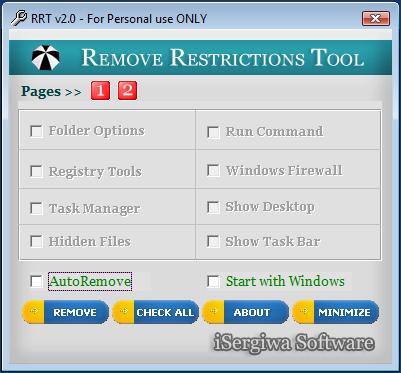
But now, there is a way for you to get back the disabled Folder Options, Task Manager, Regedit and some other applications/services. The tool is called Remove Restrictions Tool (RRT). RRT can re-enable all what the virus had previously disabled and I really recommended you to download and keep it in your PC. Next time, if you or your friend’s PC got infected, you can use this tool to remove the restrictions.
Once you have downloaded the tool, boot up the PC in Safe Mode (press F8 when the boot up and choose Safe Mode) and then login into the infected user account. Launch RRT and check the disabled options and click Remove. Finally, restart the PC and the account has back to normal.
[Download Remove Restrictions Tool (RRT)]
Restore Task Manager, Regedit and Folder Options Disabled by Virus [via Raymond.CC]

Thanks for the linkback.
no problem. thanks for sharing the great tool. 🙂
Nice software. I have waiting for this tool a long time ago. Thanks for sharing.
Thanks for sharing…Now I don’t have to enable folder option, task manager one by one because this tool has it all..;)
Hey is this actually removing the virus causing it?
Great tool by the way.
CyberSix – Yup! You are right. This tool can do all the messy…
Zonus – Yeah. Just download this tool and you can enable back anything that has been disabled by the virus.
Comment has been edited as requested by the author. -CypherHackz.
sorry double post..i think this tools is great http://michealsoft.blogspot.com/2007/10/free-hahajs-datok-virus-remover.html
phyzhoe – Did you mean that this tool install virus in our PC?
yup..i use AVG to remove it since software provided by isergiwa just scan it then to remove the virus we need to buy it..
@phyzhoe
On the link to Raymond.cc blog mentioned above, you will read Raymod said to a guy who said something like what you said:
Raymond said:
You’re being paranoid. I wouldn’t want to tarnish my reputation by placing a “god damn trap†on my website.
Maybe you’re too newbie to know that antivirus does gives out false positives? If you’re too scared to use it, then don’t use it.
I’ve scanned it with 30 types of antivirus using virustotal and only 3 reported the file as suspicious and 2 as packer. Do you even know what a packer is?
Before you come bashing me, make sure you know what you’re talking about instead of saying “there’s a god damn trapâ€.
Duh…
—-End of Raymod statments—-
Well, I, Issam Sergiwqa, the creatore of RRT and other security tools say the same thing as Ramond to you.
RRT and my other tools being tested & hosted by reputable websites like Softpedia.com, Brothersoft.com, CNET.com and are available for download from those sites. If you think you are smarter than the guys on CNET.com to the degree you were able to detect a virus in my tool wehn the weren’t, then this will be your business. But please, DO NOT try defame the other’s business!
Thank you
dammit..i am not thinking what i am doing..actually i write a review about this tools to..mayb i download the crack version of this..yea you r right..i am still newb..still far from all of this..mayb cyperhackerz.net can remove my complain. Please for the sergiwa sake. i already write an email to isergiwa
Hi,
phyzhoe that was so nice of you to say. Never mind it’s ok.
And yes, beside the false positive thing, you might downloaded a cracked or even a “trapped” version of RRT, this happens a lot.
According to my investigating, I found some fake copies of my programs on the internet available for download. Those copies are either corrupted or old or even merged with Trojans and Spyware by some bad guys who want to take advantage of the fame of my programs to pass their bad purposes!
On my website, you’ll find the MD5 hashes for all my programs. If you found one of them differ from the one you downloaded, please cease using it and download the original copy from my website.
Thank you
@isergiwa..this is my contribution [..The Best software to remove most restriction done by virus..]..sorry for the bad english
http://michealsoft.blogspot.com/2007/10/best-software-to-remove-most.html
phyzhoe – I have edited the comment as you requested. 🙂
iSergiwa – Thanks for clearing the blurry in our head. I’m using your tool and did not found any virus in it. That’s why I confused when phyzhoe said that your tool contains trojan. But anyway, thanks for sharing your great tool. 😉
@phyzhoe
Thank you for your nice contribution 🙂
@CypherHackz
Thank you for taking care of the situation that fast. Thank YOU. 🙂
tq sebab bg tau tools ni
sebelum ni aku pakai cara manual, taip command kt run tu je…
dah ada ni senang sket keje … 😀
No problem bro. 🙂
thankz 4 da info.
great post
Very nice informative post… thanks for explaining using screenshots…
Thanx alot, thank you very much