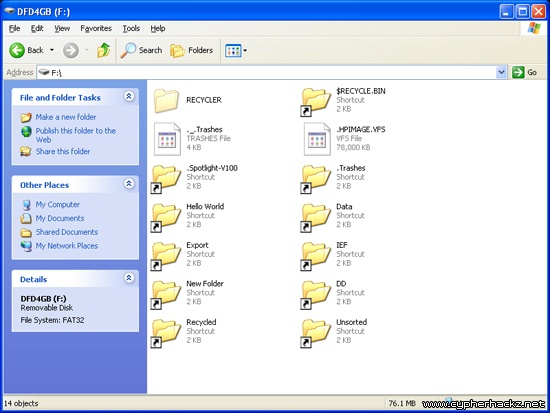
My USB thumb drive got infected by a trojan virus. All folders in the thumb drive had become shortcuts!
From the properties, the shortcut folder is pointing to 0x29ACAAD1.exe file. Kaspersky detects it as Trojan.Win32.VBKrypt.cvcu, and 35 out of 42 antivirus companies confirmed that it is a trojan virus – VirusTotal result.
Warning: Don’t double click the shortcut or you will execute the trojan virus.
Luckily, you don’t need a data recovery tool to fix this problem. The only thing that you need is just the command prompt.
Here I’ll show you how:
- Go to Start > Run.
- Type, “cmd” and click Ok.
-
Now type this command, and press Enter:
attrib -h -r -s /s /d f:\*.*
Note: Replace f: with your USB drive letter.
- Done.
You will see two folders in the USB thumb drive. One is the shortcut, and the other one is the original folder as shown below.

Now copy the orginal folders to a safe place, and format your USB thumb drive. This to ensure that your thumb drive is completely free from the trojan virus, and don’t forget to scan your computer with antivirus too.
That’s all. Hope this help!
Btw, if your files and folders are suddenly missing/hidden in USB thumb drive, follow this trick to unhide them.
PS: If your PC still having problem, you can either scan your PC with antivirus or repair it to speed up by using Registry Easy.

hi i got this problem but when i execute this in the cmd.exe
attrib -h -r -s /s /d f:\*.*
it says access denied
open cmd in administrator
and then do
Very nice command is working and data get back now thank you very much………
Showing Access denied but still it is working…
Thanx friend.. I recovered my important data
I am already in Admin profile, i’m still getting the access denied
nice job my frenz!!
Thousands of html files infected with HTML/Drop.Agent.AB virus.
Kindly requesting a script file for cleaning the infected files. Script should accept Drive letter as argument. Need a Windows shell or VB script to run on Win-(XP,Vista,7), to recursively search through a entire drive/partition for html files, CLEAN files by Deleting everything after “” i.e. “closing HTML tag”, virus code starts from this point and create a log file for listing of edited files.
NO NEW FILES TO BE CREATED (strict rule).
Nice job! helpful, thanks.
it says :
Access denied – G:\$RECYCLE.BIN\S-1-5-21-3471445141-596948144-816103079-1000\$RJ
Q1DPI\DE\animation.exe
Access denied – G:\$RECYCLE.BIN\S-1-5-21-3471445141-596948144-816103079-1000\$RJ
Q1DPI\EN\animation.exe
Access denied – G:\$RECYCLE.BIN\S-1-5-21-3471445141-596948144-816103079-1000\$RJ
Q1DPI\ES\animation.exe
Access denied – G:\$RECYCLE.BIN\S-1-5-21-3471445141-596948144-816103079-1000\$RJ
Q1DPI\FR\animation.exe
Access denied – G:\$RECYCLE.BIN\S-1-5-21-3471445141-596948144-816103079-1000\$RJ
Q1DPI\ISSetupPrerequisites\{726F97A8-63B9-4A58-ACFB-B8A56B383740}\msxml6_x86.msi
Access denied – G:\$RECYCLE.BIN\S-1-5-21-3471445141-596948144-816103079-1000\$RJ
Q1DPI\ISSetupPrerequisites\{726F97A8-63B9-4A58-ACFB-B8A56B383740}
Access denied – G:\$RECYCLE.BIN\S-1-5-21-3471445141-596948144-816103079-1000\$RJ
Q1DPI\IT\animation.exe
Access denied – G:\$RECYCLE.BIN\S-1-5-21-3471445141-596948144-816103079-1000\$RJ
Q1DPI\KR\animation.exe
Access denied – G:\$RECYCLE.BIN\S-1-5-21-3471445141-596948144-816103079-1000\$RJ
Q1DPI\SCH\animation.exe
Access denied – G:\$RECYCLE.BIN\S-1-5-21-3471445141-596948144-816103079-1000\$RJ
Q1DPI\TCH\animation.exe
Access denied – G:\$RECYCLE.BIN\S-1-5-21-3471445141-596948144-816103079-1000\$RJ
Q1DPI\Cedar.dbd
Access denied – G:\$RECYCLE.BIN\S-1-5-21-3471445141-596948144-816103079-1000\$RJ
Q1DPI\Cedar.txt
Access denied – G:\$RECYCLE.BIN\S-1-5-21-3471445141-596948144-816103079-1000\$RJ
Q1DPI\DE
Access denied – G:\$RECYCLE.BIN\S-1-5-21-3471445141-596948144-816103079-1000\$RJ
Q1DPI\demo32.exe
Access denied – G:\$RECYCLE.BIN\S-1-5-21-3471445141-596948144-816103079-1000\$RJ
Q1DPI\EN
Access denied – G:\$RECYCLE.BIN\S-1-5-21-3471445141-596948144-816103079-1000\$RJ
Q1DPI\ES
Access denied – G:\$RECYCLE.BIN\S-1-5-21-3471445141-596948144-816103079-1000\$RJ
Q1DPI\FR
Access denied – G:\$RECYCLE.BIN\S-1-5-21-3471445141-596948144-816103079-1000\$RJ
Q1DPI\gdiplus.dll
Access denied – G:\$RECYCLE.BIN\S-1-5-21-3471445141-596948144-816103079-1000\$RJ
Q1DPI\ISSetupPrerequisites
Access denied – G:\$RECYCLE.BIN\S-1-5-21-3471445141-596948144-816103079-1000\$RJ
Q1DPI\IT
Access denied – G:\$RECYCLE.BIN\S-1-5-21-3471445141-596948144-816103079-1000\$RJ
Q1DPI\KR
Access denied – G:\$RECYCLE.BIN\S-1-5-21-3471445141-596948144-816103079-1000\$RJ
Q1DPI\SCH
Access denied – G:\$RECYCLE.BIN\S-1-5-21-3471445141-596948144-816103079-1000\$RJ
Q1DPI\Seagate_Manager.exe
Access denied – G:\$RECYCLE.BIN\S-1-5-21-3471445141-596948144-816103079-1000\$RJ
Q1DPI\start.exe
Access denied – G:\$RECYCLE.BIN\S-1-5-21-3471445141-596948144-816103079-1000\$RJ
Q1DPI\TCH
Access denied – G:\$RECYCLE.BIN\S-1-5-21-3471445141-596948144-816103079-1000\$RT
HJRQ6\S-1-5-21-2009832974-670866683-1287559378-1005
Access denied – G:\$RECYCLE.BIN\S-1-5-21-3471445141-596948144-816103079-1000\$RJ
Q1DPI
Access denied – G:\$RECYCLE.BIN\S-1-5-21-2177543669-2062368359-1506785694-1000
Access denied – G:\$RECYCLE.BIN\S-1-5-21-3348415276-3530887630-3728895030-1000
Access denied – G:\$RECYCLE.BIN\S-1-5-21-579135528-1097029123-891382625-1000
PLZ HELP ME !
It worked for me. Thanks!
how do you get rid of this virus on your pc. windows 7
yeah….thx so much..very helpful!!
THANX BRO !! YOU SAVE MY LIFE !!!
yessssssssssss!it really worked!huhu!you save my lifeeeeeeeeeeeeeeee!love you!thank you so muchhhhhhhhhhhhhhhh!
Wow! Thanks very much! It worked for me! wow! Thanks for this post!
It Works for me. It was my BB that got infected. Anyway, thanks a LOT!
I tried this, I infact created a batch file as I have various partitons
I get the error access denied in every partition & I am the admin, only profile on this pc.
running win xp sp2
it did work thanks for ur great job and help.
Thank’s bro, it works for me…
its work… thank’s bro
yaaa realy works
thanks a lot. It works!! L-)
access denied.. f: volume information??
yaar but in cmd it is coming that parameter is incorrect
what to do? plz tell me
it works for me… tnx a lot 🙂
there is another software developed by UiTM Virus Shortcut Remover..VERY Easy to use
thank you, it’s really help me 🙂
OMG I CANT SAY THANK-YOU ENOUGH TIMES !!! THANK U TIMES 3249999999999!!!!! THANK U THANK U !
hi! everytime i type attrib -s -h /s /d *.*, it says that file not found
how could i fix this one? for your kind assistance pls. thanks
open usb in linux ….
command,It works,thnks. pls use space wherever reqd
Tnx. easiest fix i have done. thanks a lot.
Many thanks!! You saved my life!
Is not working on my!!
After I typed in this
attrib -h -r -s /s /d f:\*.*,
I have this back….
C:\Users\Tanny>attrib -h -r -s /s /d g:\*.*
C:\Users\Tanny>
and nothing charge in the shortcuts folders
please help……….
thanks,dude it’s working…but before this i’m doing double click -_-
YOU’RE A HERO MAN :**
it’s working.. thanks
Really good
Thanks a lot. It worked.
my external was infected by a trojan. I created a shorcut but when i double click it my files/folders are still there. My problem is how to remove the shorcut of my external? 🙁
typo on my first comment … I mean it created a shorcut? What to do? I don’t know if I needed to use CMD even though the files are not hidden but I still used it and said access denied :((
okay it’s me again. Hihi :} I would like to say “IT WORKS! FINALLY IT WORKS” THANK YOUUU!~~ All I have to do is to wait for minutes after the access denied and tadaa~ 🙂 The shortcut and my files was seperated already. I just have another question … there are phototumbs, folder of recycle bin and other files occured after using cmd. Can I delete it? Nothing will happen on my external if I delete it?
thanks sir very much…………………………………………………………………………………………………………………………………………………………………………………….loots of thanks…………….,.,.,..,.,.,.
Nice job! thanks!
Thank you so much. I have looked for a solution for a long time.. thank you
Thanks bro. u resolve my problem, keep helpful God surly grace and bless you..!!
yoo
thanks………its helping me….:))) God Bless you..
my antivirus detected the virus first and move them to virus vault. my question, it’s the file still there or already been eliminated by the antivirus? can i used this method after my antivirus remove those viruses?
i typed attrib -h -r -s /s /d g:\*.* in cmd
but nothing is happening..
Aneesha make sure to type the command correctly it will help you. remember to put a space. it should appear as this attrib -h -r -s /s /d f:\*.*
. Also when typing, your memory stick with hidden folders should be attached to PC. Try now
Thanks, I got similar problem but executing the command with the procedures it worked. keep helping. Thanks once more
Thanks a lotttssssssssssss…appreciate this. I can recover back my file that has been shorcut. thanks thanks…
tnx so much!!!!
thanks for your help
muchas gracias! ikut step ni bole bukak folder balik. simple. take time sikit klu folder size besar 🙂
its working ! thnks!!
TQ very much for the tip
Hi. I’ve had this problem. I actually reacted by deleting my shortcut. I only discovered all these after my panic attack. Can I still recover them? Is there a solution? Apparently all my files are still in tact, the size never budged. But I’ve removed all the shortcuts. And the virus already triggered multiple times because I double clicked it a lot of times. But my anti-virus managed to deal with them before they could get to my main com.
Is there anything I can do? It’s really urgent.
thank you so much!!!!