Do you want to change Yahoo! Messenger title bar to be like this?
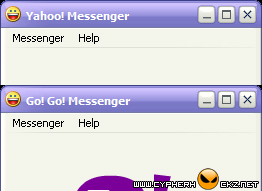
If the answer is YES, please continue reading…
In your Yahoo! Messenger installation folder (eg: C:\Program Files\Yahoo!\Messenger), look up for a filename with ‘ymsgr.ini’. Open it with your favourite text editor like EditPlus 2 and add this code at the end of the file.
[APP TITLE]
CAPTION=put your text here
Put any text that you want to display at the CAPTION and click Save.
Now, reopen your Yahoo! Messenger and you will see the title bar is now changed to the text you have typed earlier.
Menukar Title Bar Yahoo Messenger [via menteil.net]

boleh tak nama sendiri nih … 😉
Its really a nice hack…. cool one…
yupz Harith. you can put whatever text you want there.
btw, nice tut cypher 😉
mampir,..berkunjung,…salam sukses!
OR you could just edit the window title in the Registry editor. This is able to be done with ALL programs as far as i am aware.
salam cypherhackz..sy nk try wat mende ni..tp kt ym v.10 ni xde la bro..mcm yea bro…??