This trick is simple but it is really geeky. Did you know that you can hiding your files in JPG image? Here I will show you how. But before we can proceed, prepare our tools first.
Tools
- WinRAR
- Command Prompt
- Hidden files (Eg: password.txt)
- A JPG image file (Eg: nerd.jpg)
Ok, now we move on how to do this trick. Btw here is my nerd.jpg.

1. Put your hidden file and your image file in the same folder. Here I have password.txt and nerd.jpg. Both I put in a folder I named it Secret in drive D.
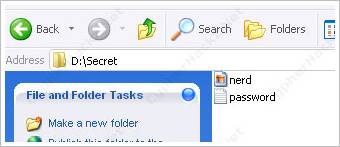
2. Put all these files into a RAR archive. I named this archive as Hidden.rar

3. Open Command Prompt and go to the folder where you place the files. Type the following command,
copy /b nerd.jpg + hidden.rar cool.jpg
where nerd.jpg is our original image file, hidden.rar is our RAR archive and cool.jpg is the JPG image file that we want to create.

4. Now you will have 4 files in the folder. nerd.jpg, password.txt, hidden.rar and cool.jpg

5. If you open cool.jpg file, you will see the same image like nerd.jpg.

6. If you open cool.jpg file with WinRAR, here is what you will get.

Secret files in JPG image file.
7. Below is my cool.jpg image file. Try open the file with WinRAR and read what I wrote in the password.txt file. :p

Btw if you want to make it more secure, use encryption when you create the archive file. [tags]winrar, encryption, hidden file[/tags]
Edit: You also can use WinZip to do this trick. Thanks to iCalvyn.

im the first one to comment? Nice tips and article. thanks
It works. Good and thanx a log. But if we re-size the image, the file becomes corrupted.
Damn man, This is going to be so handy! Thanks man.
Wait but when you “Open In Winrar” How do you do that?? “Open With”? Cause Its default as open with w/e Image Viewer Program right?
[Comment ID #45794 Will Be Quoted Here]
thank you. 🙂
[Comment ID #45818 Will Be Quoted Here]
yea. use the “open with…” option.
Very cool man..i will try this..thanks
It’s also known as Steganography.
Good Howto.
nice…will come in handy in time
That’s pretty impressive! I wonder will this image display properly on web too?
[Comment ID #45851 Will Be Quoted Here]
that image works perfectly in web. see the last image in my post.
Awesome trick, I will definitely use it.
Guess many people use this to send trojans to users.
[Comment ID #45895 Will Be Quoted Here]
i think AV can detect it.
Experimenting time?
Nice tutorial man . Is there any limit on the file size which we can hide .
[Comment ID #45902 Will Be Quoted Here]
huh? :p
[Comment ID #46316 Will Be Quoted Here]
i think there is no limit on the file size but you will notice that the image file size is big up to 25Mb or maybe more. depends on the file size you want to hide.
Great tips. I shall test it out now. Cheers.:d
[Comment ID #45818 Will Be Quoted Here]
Just curious how this is going to be so useful? Maybe i’m missing something.
I think it’s super cool but not super useful really.
Maybe someone can shed some light!
maybe you can use to send executable files in gmail. as you may already knew, gmail won’t allow us to send exe files.
i just wonder will winzip work? i should have a try 1st
i have tested with winzip, it run the same too
cool… i will update this post. thanks. :d
dude this is cool
but I can’t get it to work when I open with winrar I get the following error:
archive is either unknown format or is damaged.
can you open the above image file? try open cool.jpg file with winrar.
yeah yours works just fine and I can add all the files I want to it. when I make one myself all I get is a larger jpg
hey I just tried again on a different computer and it worked maybe this one just likes to ride the short bus.
this is cool
thanks dude
lol… maybe you need to reinstall the winrar. 😕 he3. anyway, glad to see that it works! :d
Good tips! 😡
Hidden files inside JPGs! Sweet. :d
What about other types of files? for example .mp3?
Is it only for .txt file?
i never try hiding big file size in the image yet. but technically, you can. 🙂
old but cool trick!
There are many tools for binding files but this simple and worx!
so u wana say dat u can kinda hide a trojan there and when user opens it trojan runs as well ?? ?? >>
Thanks… Its really awesome…It really works………..
Simple and cool trick…….
good dude..
Hi dude I created jpg file combined with rar file and jpg but when I tried to open it through WinZip It shows ” Cannot open File : It doesnt appear to be a valid archive ” , could you pls let me what else I need to do
Hi Rahesh …
your problems is how to open behind file..?
so try change extension of this file..assume file name is sumit.jpg to change sumit.rar and open it and use it and enjoe it..
I try to this tricks and it work better but how to convert first position means behind this images how to get this particular file…
hw to open hide file from image…?